




















MMV5165AAS - Instructions
Keep searches simple. Use keywords, e.g. "leaking", "pump", "broken" or "fit".
Lights bulbs burned out
Really easy for a 75-year old female; just spent more time reading the online manual than actually installing the light bulbs to find out where to access the light bulbs.
Parts Used:
-
Kat from Hudson, NC
-
Difficulty Level:Really Easy
-
Total Repair Time:15 - 30 mins
-
Tools:Screw drivers
4 of 4 people
found this instruction helpful.
Was this instruction helpful to you?
Thank you for voting!
No heat
Removed case,
Discharged HV capacitor and removed cooling fan.
Unscrewed ground end of HV diode and unplugged from HV capacitor.
Installed new diode by reversing the order. In my case, the problem was the magnetron was bad, so I replaced it as well.
Discharged HV capacitor and removed cooling fan.
Unscrewed ground end of HV diode and unplugged from HV capacitor.
Installed new diode by reversing the order. In my case, the problem was the magnetron was bad, so I replaced it as well.
Parts Used:
-
John from SANTA CLARA, CA
-
Difficulty Level:Really Easy
-
Total Repair Time:30 - 60 mins
-
Tools:Screw drivers
4 of 4 people
found this instruction helpful.
Was this instruction helpful to you?
Thank you for voting!
microwave dish would not move back and forth
unscrewed the bottom of the microwave and unplugged old part then took the screw out and put new one in. Super easy!
Parts Used:

-
Susan from HENDERSON, NV
-
Difficulty Level:Really Easy
-
Total Repair Time:15 - 30 mins
-
Tools:Screw drivers
7 of 14 people
found this instruction helpful.
Was this instruction helpful to you?
Thank you for voting!
Replace bulb under the microwave
Piece of cake. One screw to release the dropdown light diffuser. Just remember, the you're screwing the new bulb in from a reverse perspective. Also this site sends the correct part the first time.
Parts Used:
-
Verne from HENDERSONVLLE, NC
-
Difficulty Level:Very Easy
-
Total Repair Time:Less than 15 mins
-
Tools:Screw drivers
5 of 8 people
found this instruction helpful.
Was this instruction helpful to you?
Thank you for voting!
Microwave did not work; no clock, etc. 120VAC at duplex outlet OK. Thought there must be an internal in line fuse or reset.
Unplug microwave! It's NOT necessary to remove microwave from above stove. Removed two Philips head screws on top front of unit to remove front grille. Removed one screw to remove control panel, letting it hang down. Found inline fuse in cabinet where line cord wires come in. Pulled out blown fuse with thumb and forefinger. Snapped in new fuse, replaced control panel and grille with the three screws. Plugged in the microwave. -Worked great! Good opportunity while grille was off to clean it and replace the charcoal filter inside the cabinet.
Parts Used:

-
Lisa from DURHAM, NC
-
Difficulty Level:Very Easy
-
Total Repair Time:Less than 15 mins
-
Tools:Screw drivers
3 of 3 people
found this instruction helpful.
Was this instruction helpful to you?
Thank you for voting!
When the MW door was opened a fan would start running. Close the door the fan would go off.
Removed the MW from the wall. Took the top screws off the air vent. Then removed the two screws holding on the display. I then moved the display to its side and it revealed the micro switches. I removed the plug in leads from the micro switch one at a time. I did this with all three micro switches only one at a time. I reinstalled everything and plugged it in. No more fans starting when the door is opened.
Parts Used:


-
vic from Allen, TX
-
Difficulty Level:Easy
-
Total Repair Time:15 - 30 mins
-
Tools:Screw drivers
4 of 6 people
found this instruction helpful.
Was this instruction helpful to you?
Thank you for voting!
food does not get hot, carousel did not turn, all other indicators worked
Read the troubleshooting section on this site. Figured it was an interlock problem because the food was not getting hot (magentron not turning on) and the carousel was not turning. Did not think both the carousel motor and magnetron failed at same time, thus indicated an interlock problem. The interlock switches are actuated by the door latch. Replaced the assembly locker piece with all three switches (only a $20 dollar part) and microwave was fully operational again. Wife and kids think I am a hero.
Parts Used:
-
John from SEVERN, MD
-
Difficulty Level:Really Easy
-
Total Repair Time:30 - 60 mins
-
Tools:Screw drivers
3 of 3 people
found this instruction helpful.
Was this instruction helpful to you?
Thank you for voting!
Exterior light bulb (PS2376034) broken off in socket. No access for pliers after glass cover removed.
Unplug appliance. Remove total of 7 phillips screws from sides and front of bottom panel . Panel front drops down, remove one socket screw and socket. Now have access for lineman' s pliers to unscrew bulb base. Reinstall socket, replace bulb and 7 panel screws. Restore power.
Parts Used:
-
Alvin from HILTON HEAD, SC
-
Difficulty Level:Easy
-
Total Repair Time:30 - 60 mins
-
Tools:Pliers, Screw drivers
3 of 4 people
found this instruction helpful.
Was this instruction helpful to you?
Thank you for voting!
light bulb burnt out .
-
DAN from CARPENTERSVLE, IL
-
Difficulty Level:Really Easy
-
Total Repair Time:30 - 60 mins
3 of 4 people
found this instruction helpful.
Was this instruction helpful to you?
Thank you for voting!
Door switch was burnt out
-
Edward from ORCHARD PARK, NY
-
Difficulty Level:Really Easy
-
Total Repair Time:15 - 30 mins
-
Tools:Nutdriver
5 of 10 people
found this instruction helpful.
Was this instruction helpful to you?
Thank you for voting!
Range light bulbs were burned out
We needed a phillips head screw driver to remove the single screw holding the light bulb cover in place.
Removing the old bulbs was a little work, because they had come loose from the sockets. We unplugged the microwave, so we could grip the sockets with a tool. I think my husband used a needle nose plier for this.
The new bulbs screwed in easily, and then we refastened the light bulb cover with the phillips head screw driver.
Removing the old bulbs was a little work, because they had come loose from the sockets. We unplugged the microwave, so we could grip the sockets with a tool. I think my husband used a needle nose plier for this.
The new bulbs screwed in easily, and then we refastened the light bulb cover with the phillips head screw driver.
Parts Used:
-
Barbara from MERIDIAN, ID
-
Difficulty Level:Very Easy
-
Total Repair Time:Less than 15 mins
-
Tools:Pliers, Screw drivers
3 of 4 people
found this instruction helpful.
Was this instruction helpful to you?
Thank you for voting!
light bulb burned-out
-
Pablo from Burlingame, CA
-
Difficulty Level:Really Easy
-
Total Repair Time:Less than 15 mins
13 of 34 people
found this instruction helpful.
Was this instruction helpful to you?
Thank you for voting!
bad filter
-
John from NORMANGEE, TX
-
Difficulty Level:Really Easy
-
Total Repair Time:Less than 15 mins
3 of 5 people
found this instruction helpful.
Was this instruction helpful to you?
Thank you for voting!
Burned out light in microwave
Spouse just screwed in the new bulb and reinstalled the light cover plate with the two screws. Took under a minute. Works great.
Parts Used:
-
DANNY from SAINT JOHNS, FL
-
Difficulty Level:Very Easy
-
Total Repair Time:Less than 15 mins
-
Tools:Screw drivers
4 of 8 people
found this instruction helpful.
Was this instruction helpful to you?
Thank you for voting!
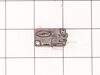
Oven would not start when closing door.
Removed some cosmetic panels. Removed the assembly with micro switches. Examined the faulty switch by checking the clicking action of switch. Two others were ok by this method. Replaced the switch with new one. Works fine so far. Thanks to web site and YouTube videos.
Parts Used:
-
Raymond from DEPEW, NY
-
Difficulty Level:Easy
-
Total Repair Time:Less than 15 mins
-
Tools:Screw drivers
4 of 8 people
found this instruction helpful.
Was this instruction helpful to you?
Thank you for voting!