




















KSM180LELB5 KitchenAid Mixer - Instructions
Keep searches simple. Use keywords, e.g. "leaking", "pump", "broken" or "fit".
The mixer was given to my wife. Sometimes it would work or not.
When I took the back cover off I found two parts that "could" be the problem. The speed control plate was cracked which explained the spotty working. I ordered both parts and installed them very easily. The parts fit perfectly and resulted in the mixer working perfectly. I can't say enough about the excellent parts. They were perfect.
Parts Used:

-
James from SAINT PAUL, MN
-
Difficulty Level:Very Easy
-
Total Repair Time:15 - 30 mins
-
Tools:Pliers, Screw drivers
1 of 2 people
found this instruction helpful.
Was this instruction helpful to you?
Thank you for voting!
The mixer started getting weak like a gear was stripped and then quite working all together.
I removed the decorative band that covers the seam by removing 1 screw. I then removed the top portion of mixer by removing 4 square head screws. You will then see the gear housing in the front of the mixer. Remove the 4 screws holding that on. There are no spring that are going to pop out and you never know where they went, but be careful because there is a lot of grease and a gear that it just laying in there on the right side. You will see the stainless shaft with a couple on gear cogs on it. Remove the retaing spring from the shaft and pull the top gear off, it may be a little snug. You will then see the dowel pin, mine was sheared off but I could see where it was. Be sure to remove the broken pieces. Use the punch to knock out the remaining pin. Replace with new pin making sure it is evenly exposed on both side of the shaft. Replace the top gear, then the retaining spring, the the gear housing cover, then the mixer top cover and finally the decorative band. Be sure to unplug before you start. These mixers are expensive and expensive to have someone fix them. I ordered 2 pins because shipping is a little high and the pin is cheap. I fixed this for $17.00 total and have a spare pin.
Parts Used:

-
Lane from Warrior, AL
-
Difficulty Level:Easy
-
Total Repair Time:30 - 60 mins
-
Tools:Nutdriver
3 of 8 people
found this instruction helpful.
Was this instruction helpful to you?
Thank you for voting!
Damaged the worm gear in our 300w mixer.
After stalling the mixer while mixing dough I found that the motor still functioned but the blade didn't move. I basically took the mixer into my shop along with a digital camera to record any complicated disassembly procedure I might have to deal with for reassembly and proceeded to disassemble the mixer. Once apart, I cleaned the mixer parts, removed the broken worm gear and bracket, and got online for someone that carried the replacement piece. PartSelect sent the replacement within 3 days and now it works great again.
Parts Used:

-
H. from Hollister, CA
-
Difficulty Level:Really Easy
-
Total Repair Time:15 - 30 mins
-
Tools:Screw drivers
1 of 2 people
found this instruction helpful.
Was this instruction helpful to you?
Thank you for voting!
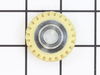
worn gear
-
Robert from Auburn, ME
-
Difficulty Level:Easy
-
Total Repair Time:15 - 30 mins
-
Tools:Screw drivers
2 of 5 people
found this instruction helpful.
Was this instruction helpful to you?
Thank you for voting!
Mixer suddenly ceased operation after sharp noise
To access the interior of the mixer, I first removed the single screw holding the cup-shaped part at the rear. Then I removed the 4 large screws on the under surface of the mixer head. Next I removed the bright metal ring around the planetary gear area by prying it off. I then pried the dish-shaped part off the shaft using a large-bladed screwdriver. This exposed 5 screws on the circumference of the planetary gear. By removing them, one can pull up the gears and see into the area below. I found the worm gear had fractured. By removing 3 screws at the base I extracted it for closer inspection, checking for any loose pieces. Beware of the jelly-like grease. The replacement part goes into position, and one then follows the steps in reverse.
Parts Used:
-
Walter from Athens, GA
-
Difficulty Level:A Bit Difficult
-
Total Repair Time:1- 2 hours
-
Tools:Screw drivers
2 of 5 people
found this instruction helpful.
Was this instruction helpful to you?
Thank you for voting!
Mixer still ran, but seemed to be getting very loose as if gears or a shaft were wearing out.
I followed the video provided online. The model shown was not exactly the same as mine, but very close. The step-wise progression demonstrated on the video helped a lot. I had to double check the video a couple of times which added to the work time....I could probably do it again without the video in under 1 hour. As shown in the video, I laid out an old towel across two pieces of 2x4 which helped keep the mixer head in a position that was easy to work on and also prevented scratches.
Parts Used:
-
Harry from MILTON, WA
-
Difficulty Level:Easy
-
Total Repair Time:1- 2 hours
-
Tools:Screw drivers
1 of 3 people
found this instruction helpful.
Was this instruction helpful to you?
Thank you for voting!
Worn out worm (nylon) gear.
Followed up by your précised video, and print copy's which helped me a lot. That's easy!
Parts Used:
-
Anthony from Altadena, CA
-
Difficulty Level:Really Easy
-
Total Repair Time:30 - 60 mins
-
Tools:Screw drivers
Was this instruction helpful to you?
Thank you for voting!
Teeth broke off pinion gear

-
Kevin from Volant, PA
-
Difficulty Level:Easy
-
Total Repair Time:1- 2 hours
-
Tools:Screw drivers
Was this instruction helpful to you?
Thank you for voting!
Worm gear broken.
-
Erwin from Northport, ME
-
Difficulty Level:Really Easy
-
Total Repair Time:1- 2 hours
-
Tools:Pliers, Screw drivers
Was this instruction helpful to you?
Thank you for voting!
37 year old screw cap worn, wouldn't hold bowl with heavy dough
Easy removal of old screw cap, but new one didn't just drop in. Had to scrape paint and a little aluminum to make it fit. Finally did, and it works fine now.
Parts Used:

-
William from Spring Valley, CA
-
Difficulty Level:A Bit Difficult
-
Total Repair Time:More than 2 hours
-
Tools:Screw drivers
Was this instruction helpful to you?
Thank you for voting!
Motor runs, no motion at the business end of the mixer.
Took the mixer down to the gear box. Found the plastic drive gear had a few stripped teeth. Did a search on the internet for the mixer gear. Found a couple of suppliers. Ordered the needed gear, pin and a bearing block just in case it was worn. The bearing block did not need to be replaced. Cleaned the broken off teeth from the gear grease and put the mixer back together. All worked fine when I plugged it in.
Parts Used:


-
Robert J from Stephenson, MI
-
Difficulty Level:Easy
-
Total Repair Time:30 - 60 mins
-
Tools:Screw drivers, Socket set, Wrench (Adjustable)
Was this instruction helpful to you?
Thank you for voting!
Mixer would stop spinning.
I found a video on how to repair mixer that would not turn. Watched video several times and replaced worn worm gear. Getting the old worm gear was the most difficult part of the job. I had to go purchase a pin punch ($5.50) with the correct tool is was easy.
Parts Used:
-
Joseph from Cincinnati, OH
-
Difficulty Level:Easy
-
Total Repair Time:30 - 60 mins
-
Tools:Pliers, Screw drivers
Was this instruction helpful to you?
Thank you for voting!
One of the parts broke 3 teeth and did not work anymore.
Unscrew and dismounted the mixer, gather all pieces and screws, cleaned and washed every part, took away the old grease and replaced it with a new one, also looked carefully for the lost teeth and found them, Put grease in every part, put back and screwed all the pieces of the mixer, then tried the mixer which worked really well.
Parts Used:
-
Amalia from Granville, OH
-
Difficulty Level:Easy
-
Total Repair Time:30 - 60 mins
-
Tools:Screw drivers
Was this instruction helpful to you?
Thank you for voting!
My kitchenaid stopped moving
My husband looked at youtube to figure out what the issue was. He saw a video that identified that the likely problem was the worm gear. My husband took the kitchenaid applicance apart, as he saw in the video. We ordered the part, it took less than a week to arrive. He rewatched the video that demonstrated how to put the kitchenaid mixer back together. It's a bit messy due to all the packing grease, but a pair of nitrile gloves, paper towels, and an old rag help. We put a garbage bag over the appliance after it was taken apart to protect it from any dust and my curious cat. We let the kitchenaid cycle for about a minute to make sure the gear was greased. I haven't used it to make bread yet, but I'll do that soon. Thanks for supplying the part that saved us at least one hundred dollars and TRY to get a person who will repair small appliances.
Parts Used:
-
Georgianne from Castro Valley, CA
-
Difficulty Level:Easy
-
Total Repair Time:30 - 60 mins
-
Tools:Pliers, Screw drivers
Was this instruction helpful to you?
Thank you for voting!
Worn Worm gear
I took out the worm gear and replaced it with the new one. It is important to have the correct punches that are just under the diameter of the pins.
Parts Used:
-
Michael from dahlonega, GA
-
Difficulty Level:A Bit Difficult
-
Total Repair Time:30 - 60 mins
-
Tools:Pliers, Screw drivers
Was this instruction helpful to you?
Thank you for voting!