

















Get in touch, we're here to help!
1-866-883-8386
Monday to Saturday
8am - 8pm EST
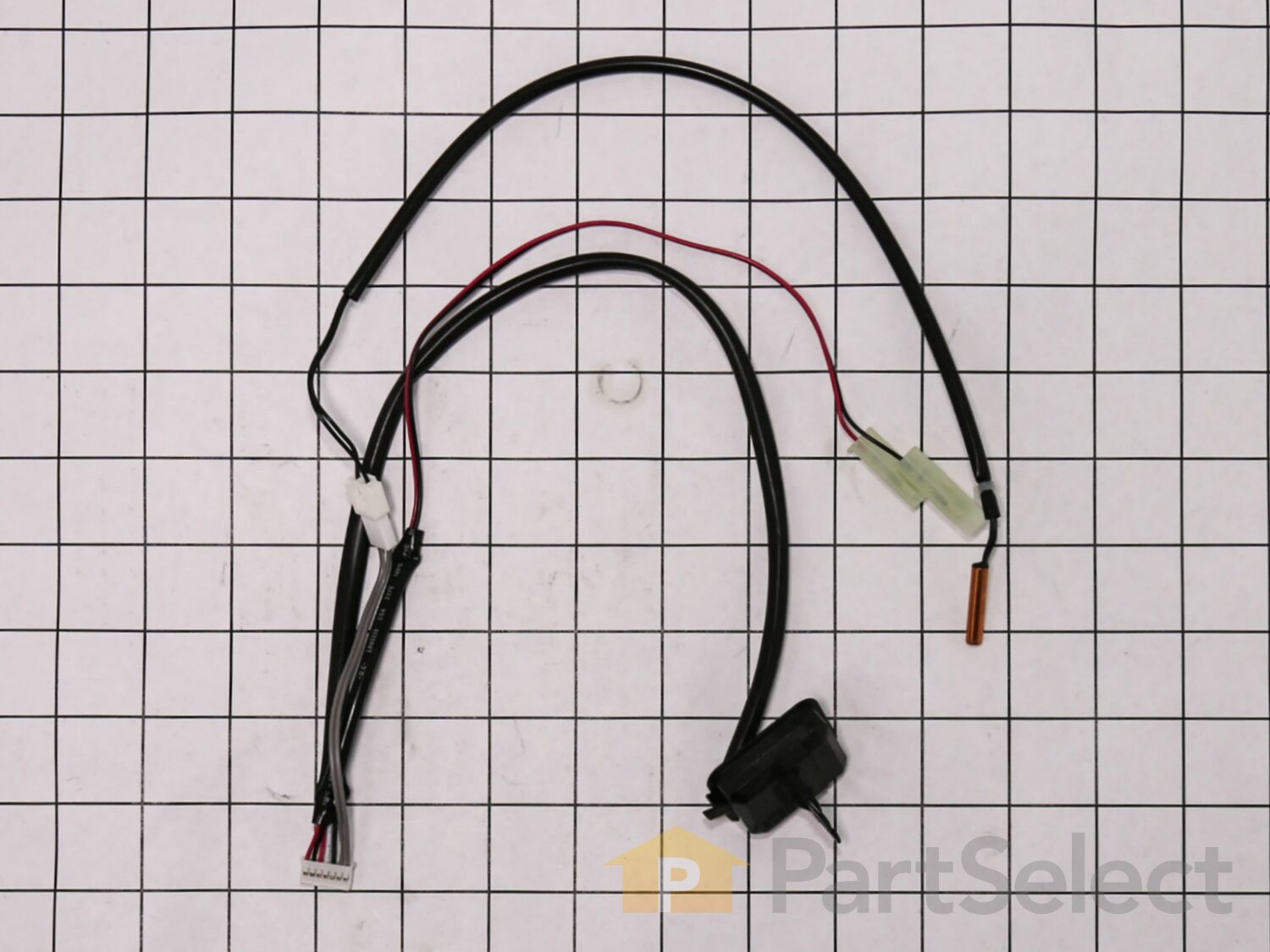
Sensor 6877A30013V
Fits your ZD300!
Rated by 3 customers
Easy
30 - 60 mins
Ratings submitted by customers like you who bought this part.
$60.62
Special Order
Fits your ZD300!
PartSelect Number
PS3654111
Manufacturer Part Number
6877A30013V
Manufactured by
LG
Product Description
Sensor Specifications
Also known as thermistor.
How Buying OEM Parts Can Save You Time and Money
Troubleshooting
This part fixes the following symptoms:
Unit says bucket is full when it isn’t | Won’t stay on
This part works with the following products:
Dehumidifier, Air Conditioner.
This part works with the following products:
LG.
Part# 6877A30013V replaces these:
AP5630247, 2313885, 6877A30013V, 6877A30013M, 6877A30013R
Customer Repair Stories
Average Repair Rating: 3.0 / 5.0, 3 reviews.
What's this?
- < Prev
- 1
- Next >
Sort by:
Search filter:
Clear Filter
Your search term must have 3 or more characters.
Keep searches simple. Use keywords, e.g. "leaking", "pump", "broken" or "fit".
Sorry, we couldn't find any existing installation instruction that matched.
bucket full light constantly blinking with error code 01 on the display
Unscrew and detached front and back panels, and inside framework holding the sheet metal to the body, after removing the sheet metal, unscrew the box enclosing the control board, use needle nose pliers to unhook the sensor module from the board and place the new sensor into the spots where the old sensor was connected (thermostat area, humidity Sensor, bucket switch, and control board). Close up the unit and your good to go.
Other Parts Used:
-
Seif from DETROIT, MI
-
Difficulty Level:Easy
-
Total Repair Time:30 - 60 mins
-
Tools:Pliers, Screw drivers
4 of 5 people
found this instruction helpful.
Was this instruction helpful to you?
Thank you for voting!
Error Code "01" and Bucket Full indication
Note: The error code and bucket full indication is a result of a malfunction in the sensor assembly (p/n 6877A30013M. To replace the sensor assembly, do the following: (1) remove rear panel; 2) remove the front panel cover and remove bucket; 3) remove main cover (covers center of unit); 4) Remove cover over PC board on top right side of unit looking at it from the rear; 5)unplug sensor assembly connect on the main PC board; 6) remove clip that holds the temperature sensor on the compressor output tube ( this is a very strong clip)(also take a small piece of emery cloth and clean the output tube where the clip was attached); 7) use a tapered tool to spread the clip, just removed to, allow the temperature sensor to be removed from the clip; 8) unplug the bucket full switch connector; 9) remove the humidity sensor from the evaporator coil (just a snap-on connection; 10) remove the entire sensor assembly that was just disconnect during steps 1) thru 9) and reinstall the new assembly using the previous steps in reverse order; 11)Plug the unit in and all should be a go!
Other Parts Used:
-
Roger from Bangor, PA
-
Difficulty Level:Really Easy
-
Total Repair Time:30 - 60 mins
-
Tools:Pliers, Screw drivers
0 of 1 people
found this instruction helpful.
Was this instruction helpful to you?
Thank you for voting!
Flashing light to empty bucket when not the case.
Replaced the sensor and solved the problem. I had a lot of difficulty with the case holding the circuit board,etc because no easy way to service. Seemes they could have made it easier with a removable panel. I actually cut the wires and re-attached the thermister later after routing. Did not use the other parts of the wiring.
Other Parts Used:
-
Allen from Wentzville, MO
-
Difficulty Level:A Bit Difficult
-
Total Repair Time:1- 2 hours
-
Tools:Screw drivers
0 of 1 people
found this instruction helpful.
Was this instruction helpful to you?
Thank you for voting!
- < Prev
- 1
- Next >
Questions and Answers
Be the first to ask our experts a question about this part!
✖
Ask a Question
Ask our experts a question on this part and we'll respond as soon as we can.
Sorry, we couldn't find a match for "".
Here's a guide for finding your model number.
Something went wrong. Please try again later.
Your Question Has Been Submitted!
Our experts will send you an email as soon as your question has been answered.
Related Parts
Produce Preserver Filter
$27.28
PartSelect Number: PS3503014
Fresh Flow Produce Preserver is made for your refrigerator to help keep produce fresh for longer by absorbing the chemical, ethylene, that causes your fruits and vegetables to ripen quicker. Your produce could be fresh f...
Affresh Washing Machine Cleaner - 3 pack
$25.31
PartSelect Number: PS1960673
Having a problem with a funky-smelling washing machine, or one that just doesnt seem to clean your clothes as well as it used to? Say hello to the Affresh Washing Machine Cleaner by Whirlpool. This powerful washing helpe...
Affresh Dishwasher Cleaner Tablets - 6
$21.95
PartSelect Number: PS12345667
Affresh dishwasher Cleaner is specially formulated to help remove limescale and mineral build-up that can be unsightly and could affect your dishwasher's performance. Each tablet is designed to clean inside your machine ...
Refrigerator Deodorizer
$37.89
PartSelect Number: PS12739141
Refrigerator deodorizers help to reduce bacteria growth and therefore reduce smells and extend the life of food.
Cooktop Cleaning Cream
$32.93
PartSelect Number: PS12717774
Make your cooktop shine with Frigidaire ReadyClean Glass and Ceramic Cleaner. Our scratch-free, streak-free formula removes smudges, grease, burnt-on food, dirt and oil, while protecting and polishing to repel dust and d...
Model Cross Reference
This part works with the following models:
PartSelect Number: PS3654111
Manufacturer Part Number: 6877A30013V
Brand
Model Number
Description
Get in touch, we're here to help!
1-866-883-8386
Monday to Saturday
8am - 8pm EST
[{"position":0,"name":"Home","title":"Home","url":"/"},{"position":1,"name":"6877A30013V","title":"6877A30013V","url":""}]
