




















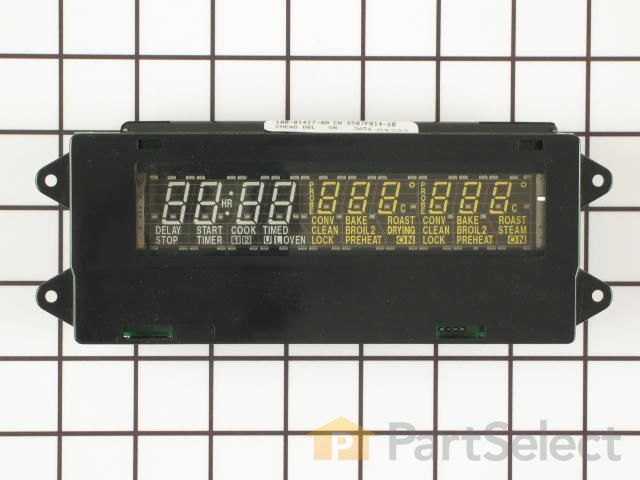

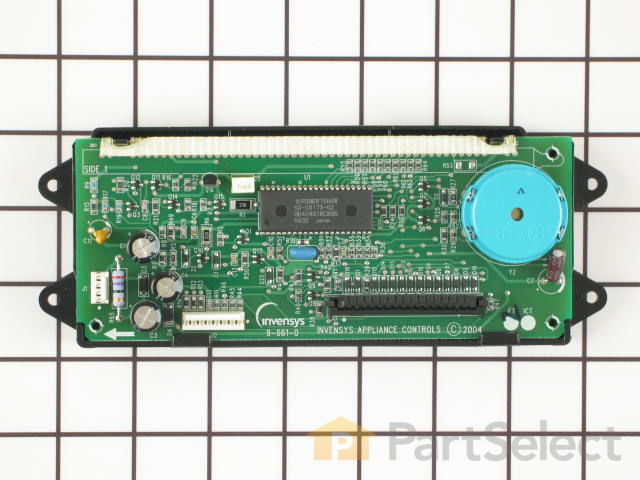
See part 2 in the diagram
( Grid squares measure 1x1 inch )


Get in touch, we're here to help!
1-866-883-8386
Monday to Saturday
8am - 8pm EST
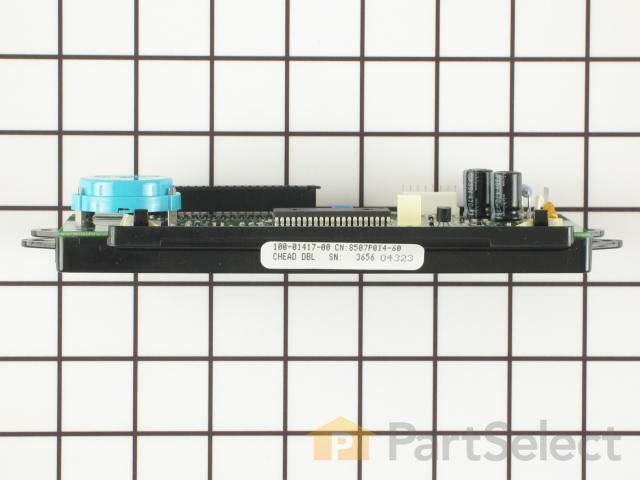
Electronic Clock Assembly WP71001872
Fits your WW27430P!
$458.18
Special Order
Fits your WW27430P!
PartSelect Number
PS11743864
Manufacturer Part Number
WP71001872
Manufactured by
Whirlpool
Product Description
Electronic Clock Assembly Specifications
This part controls the functions of your oven such as bake, broil, timed bake and the clock.

How Buying OEM Parts Can Save You Time and Money
Troubleshooting
This part fixes the following symptoms:
Will not program | Touchpad does not respond
This part works with the following products:
Wall Oven.
This part works with the following products:
Jenn-Air, Maytag, Amana.
Part# WP71001872 replaces these:
AP6010680, 71001872, 71001872R
Customer Repair Stories
Average Repair Rating: 4.2 / 5.0, 37 reviews.
What's this?
- < Prev
- 1
- 2
- 3
- Next >
Sort by:
Search filter:
Clear Filter
Your search term must have 3 or more characters.
Keep searches simple. Use keywords, e.g. "leaking", "pump", "broken" or "fit".
Sorry, we couldn't find any existing installation instruction that matched.
Dim display
This is a Jenn-Air double oven. Turned off circuit breaker to the oven. Removed 7 screws that hold the top panel in place. Removed 3 cable/connectors from the clock module so panel can be removed from oven and placed on a table. Unscrew 4 hex head screws attaching clock module to front panel. Press on two tabs and remove circuit board from plastic frame. Replace with new board reversing dis-assembly sequence.
After examining the old board I discovered that the 470 microfarad aluminum electrolytic capacitor (in the corner) was badly deformed. I replaced this. Now I have a spare board. I believe that the failure (common in Jenn-Air ovens) starts with a transient on the power line (it did with mine). This damages the capacitor which progressively gets worse. This capacitor probably acts as a low pass filter on the power supply for the display. If any of you are into electronics, I would suggest wiring a zener diode across the capacitor to suppress transients. I wish the Jenn-Air engineers had put this in the design. It would have avoided a lot of costly repairs and saved them the bad reputation that they have as a result of this board failing over and over again.
After examining the old board I discovered that the 470 microfarad aluminum electrolytic capacitor (in the corner) was badly deformed. I replaced this. Now I have a spare board. I believe that the failure (common in Jenn-Air ovens) starts with a transient on the power line (it did with mine). This damages the capacitor which progressively gets worse. This capacitor probably acts as a low pass filter on the power supply for the display. If any of you are into electronics, I would suggest wiring a zener diode across the capacitor to suppress transients. I wish the Jenn-Air engineers had put this in the design. It would have avoided a lot of costly repairs and saved them the bad reputation that they have as a result of this board failing over and over again.
Other Parts Used:
-
Gregory from Ann Arbor, MI
-
Difficulty Level:Really Easy
-
Total Repair Time:Less than 15 mins
-
Tools:Screw drivers, Socket set
29 of 31 people
found this instruction helpful.
Was this instruction helpful to you?
Thank you for voting!
Clock assembly went so dim we could not read it.
On the front panel I removed 3 screws on top and 4 screws under the bottom. Pulled the panel down to expose the computer board, removed 4 hex head screws and disconnected 2 plugs and 1 ribbon connecter. I reversed the process and used the awl to locate the screw holes and finshed in 23 minutes and saved $ 89.00.
Other Parts Used:
-
Don from Moon Township, PA
-
Difficulty Level:Really Easy
-
Total Repair Time:15 - 30 mins
-
Tools:Screw drivers, Socket set
20 of 20 people
found this instruction helpful.
Was this instruction helpful to you?
Thank you for voting!
Oven display was out
This repair is sooo easy! First I down loaded the service manual (free pdf) from Maytag as they make this appliance. They give all of the voltages for the J1 and J2 plugs. I checked those to be sure I was getting power to the board. I did not want to lay out close to $200 and then discover that the problem was elsewhere. All voltages on the J1 and J2 plugs were good. Next I ordered the clock and when it came in it may have taken me 5 minutes to replace the old board with the new one. Including time to go out to the garage and turn the power off and on. Also beware that the ribbon cable attaches to the clock with a compression type connector. The connector does not separate with the ribbon. Simply press on the two tabs on either side and then pull the ribbon from the connector. Reverse to reassemble.
Other Parts Used:
-
Dennis from Grapevine, TX
-
Difficulty Level:Really Easy
-
Total Repair Time:Less than 15 mins
-
Tools:Nutdriver, Screw drivers
17 of 18 people
found this instruction helpful.
Was this instruction helpful to you?
Thank you for voting!
oven display became gradually almost totally dim in a couple of weeks
Pulled the breaker supplying power to the oven to OFF.
Removed four screws at the bottom of the control panel assembly above the top oven door (open the top oven door to access these screws). Lifted this control panel upwards to unhook it from a metal bracket. In my case, cabinet doors just above the control panel made this operation difficult.
Tilted the panel down. At this point, cables prevent complete removal of the control panel: The electronic clock assembly is attached with four screws inside this panel and connects to electrical equipment above the oven with two cables.
Unplugged these two cables. Their connectors must be unlatched by prying with a screw driver in the right place.
Once these cables were disconnected, the control panel could be removed from the oven area.
Disconnected the ribbon cable connecting the switches on the control panel to the clock assembly. That was the tricky part. Contrary to what I thought, this ribbon cable was not terminated by a connector but just snapped in the connector mounted on the clock assembly. After some fumbling, found that I had to depress both edges of the connector which allowed lifting up one part. Then the ribbon cable could be bent slightly to disengage two holes in the ribbon from nubs in the connector assembly and pull out the ribbon.
Removed old clock assembly by removing the four screws.
Installed the new assembly with the four screws.
Connected the two cables to the new clock assembly.
Reinstalled the control panel with the new clock assembly reconnecting the two cable connectors and by sliding the control panel down over the metal plate attached to the top of the oven.
Fastened the panel with the four screws.
Turned the circuit breaker back on.
Removed four screws at the bottom of the control panel assembly above the top oven door (open the top oven door to access these screws). Lifted this control panel upwards to unhook it from a metal bracket. In my case, cabinet doors just above the control panel made this operation difficult.
Tilted the panel down. At this point, cables prevent complete removal of the control panel: The electronic clock assembly is attached with four screws inside this panel and connects to electrical equipment above the oven with two cables.
Unplugged these two cables. Their connectors must be unlatched by prying with a screw driver in the right place.
Once these cables were disconnected, the control panel could be removed from the oven area.
Disconnected the ribbon cable connecting the switches on the control panel to the clock assembly. That was the tricky part. Contrary to what I thought, this ribbon cable was not terminated by a connector but just snapped in the connector mounted on the clock assembly. After some fumbling, found that I had to depress both edges of the connector which allowed lifting up one part. Then the ribbon cable could be bent slightly to disengage two holes in the ribbon from nubs in the connector assembly and pull out the ribbon.
Removed old clock assembly by removing the four screws.
Installed the new assembly with the four screws.
Connected the two cables to the new clock assembly.
Reinstalled the control panel with the new clock assembly reconnecting the two cable connectors and by sliding the control panel down over the metal plate attached to the top of the oven.
Fastened the panel with the four screws.
Turned the circuit breaker back on.
Other Parts Used:
-
Guy from Scottsdale, AZ
-
Difficulty Level:Easy
-
Total Repair Time:30 - 60 mins
-
Tools:Nutdriver, Screw drivers
9 of 10 people
found this instruction helpful.
Was this instruction helpful to you?
Thank you for voting!
Display was unreadable and doors didn't close
NOTE: I had a repair person try to fix the door problem and he only replaced the HINGES. You need to replace both the HINGES and the HINGE RECEPTACLES to fix the door problem.
INSTALLING the clock assembly:
First I went to the electrical breaker box and turned off the power to my double oven. Then I removed the screws that hold the oven to the wall and pulled the oven out about 5 inches. I removed the cover for the controls at the top of the oven - the clock assembly is attached to the cover - several connectors need to be unplugged to remove the cover. I put the cover on my counter and unscrewed the four screws (with nutdriver) that hold the clock in place. I unclipped the control cable (flat with embedded wires) and took out the old clock. I reversed these steps to put in the new clock. I then held the cover up to the oven and reconnected the connectors to the rest of the oven, I hooked the cover back in place.
Replacing the hinge receptacles:
I opened the oven doors and removed the hinge covers (just over the hinge itself that keep the door from falling off) and lifted the doors off of the oven. Next went to the side of the oven and removed all the lag screws that attach the hinge receptacles to the oven body (you may need to remove the trim around the oven in the process as they may be too hard to get out otherwise). I put each of the four new hinge receptacles back in place and screwed in all the screws I took out before. I put the oven doors back on and replaced the hinge covers.
The oven works perfectly!! Hurray!
INSTALLING the clock assembly:
First I went to the electrical breaker box and turned off the power to my double oven. Then I removed the screws that hold the oven to the wall and pulled the oven out about 5 inches. I removed the cover for the controls at the top of the oven - the clock assembly is attached to the cover - several connectors need to be unplugged to remove the cover. I put the cover on my counter and unscrewed the four screws (with nutdriver) that hold the clock in place. I unclipped the control cable (flat with embedded wires) and took out the old clock. I reversed these steps to put in the new clock. I then held the cover up to the oven and reconnected the connectors to the rest of the oven, I hooked the cover back in place.
Replacing the hinge receptacles:
I opened the oven doors and removed the hinge covers (just over the hinge itself that keep the door from falling off) and lifted the doors off of the oven. Next went to the side of the oven and removed all the lag screws that attach the hinge receptacles to the oven body (you may need to remove the trim around the oven in the process as they may be too hard to get out otherwise). I put each of the four new hinge receptacles back in place and screwed in all the screws I took out before. I put the oven doors back on and replaced the hinge covers.
The oven works perfectly!! Hurray!
Other Parts Used:
-
Page from Concord, MA
-
Difficulty Level:Easy
-
Total Repair Time:30 - 60 mins
-
Tools:Nutdriver, Screw drivers
6 of 7 people
found this instruction helpful.
Was this instruction helpful to you?
Thank you for voting!
Digital Display Was Getting Very Dim
It took us longer to do this repair than others report, but the repair was relatively easy. As with others, our clock display was getting very dim. In fact, when we turned on the oven to bake, the clock and temperature display would both completely dim. While we were not sure that the clock assembly was the part we needed, the comments from others led us to believe that replacing the clock assembly would likely fix the problem – which it did!
To be safe, we first turned off the power to the oven. Next, using a #2 Phillips screwdriver, we removed the three screws on the top of the control panel and the four screws on the bottom of the control panel. Now, the control panel is completely loose from the oven except for the two wired connectors running between the clock assembly and the oven. The two wired connectors take a little bit of care and effort to remove since a “lip” secures them. For the four-wire connector, we were able to remove the connector by wiggling and pulling on it. For the other connector, we needed to use a small flat head screw driver to bend back the lip on the clock assembly, and then still needed to wiggle and pull on the connector to get it loose. Be careful not to pull on the wires!
Note that a connector does not terminate the ribbon cable. To remove the ribbon cable, squeeze together the two tabs on each end of the connector on the clock assembly and pull up on the connector (i.e., pull away from the board). The part of the connector that you are squeezing will rise up slightly and the ribbon cable will rise up with it. (You might want to practice with the new clock assembly to see how this works as it is easier to unhook the connector when the ribbon cable is not connected.) The ribbon cable has two holes in it that fit over two pegs on the part of the connector that rises up. The ribbon cable should simply pull out once the connector is opened up.
Use a ¼” nut driver to remove the four hex head screws that attach the clock assembly to the control panel. The clock assembly is now free from the control panel, but we still needed to pull on the clock assembly to remove it since the fit was very tight.
Assembly is simply reversing the above steps. To fit the new clock assembly onto the control panel, we needed to use a pair of pliers to first slightly bend the metal tabs on the control panel outward, as the fit (as noted) was very tight. After fitting the clock assembly into place, tighten it down with the four hex head screws. If you have not already done so, release the ribbon cable assembly on the new clock assembly by squeezing the tabs and pulling up. Fit the two holes in the ribbon cable over the two pegs on the connector, and then simply push the connector piece down until it snaps into place (making sure that the ribbon cable stays on the two pegs). Take the control panel back to the oven and reconnect the other two wire connectors. To finish up, place the control panel back on the oven, replace the seven screws, and then turn the power back on.
If your experience is like ours, you will be amazed at how bright the new display is!
To be safe, we first turned off the power to the oven. Next, using a #2 Phillips screwdriver, we removed the three screws on the top of the control panel and the four screws on the bottom of the control panel. Now, the control panel is completely loose from the oven except for the two wired connectors running between the clock assembly and the oven. The two wired connectors take a little bit of care and effort to remove since a “lip” secures them. For the four-wire connector, we were able to remove the connector by wiggling and pulling on it. For the other connector, we needed to use a small flat head screw driver to bend back the lip on the clock assembly, and then still needed to wiggle and pull on the connector to get it loose. Be careful not to pull on the wires!
Note that a connector does not terminate the ribbon cable. To remove the ribbon cable, squeeze together the two tabs on each end of the connector on the clock assembly and pull up on the connector (i.e., pull away from the board). The part of the connector that you are squeezing will rise up slightly and the ribbon cable will rise up with it. (You might want to practice with the new clock assembly to see how this works as it is easier to unhook the connector when the ribbon cable is not connected.) The ribbon cable has two holes in it that fit over two pegs on the part of the connector that rises up. The ribbon cable should simply pull out once the connector is opened up.
Use a ¼” nut driver to remove the four hex head screws that attach the clock assembly to the control panel. The clock assembly is now free from the control panel, but we still needed to pull on the clock assembly to remove it since the fit was very tight.
Assembly is simply reversing the above steps. To fit the new clock assembly onto the control panel, we needed to use a pair of pliers to first slightly bend the metal tabs on the control panel outward, as the fit (as noted) was very tight. After fitting the clock assembly into place, tighten it down with the four hex head screws. If you have not already done so, release the ribbon cable assembly on the new clock assembly by squeezing the tabs and pulling up. Fit the two holes in the ribbon cable over the two pegs on the connector, and then simply push the connector piece down until it snaps into place (making sure that the ribbon cable stays on the two pegs). Take the control panel back to the oven and reconnect the other two wire connectors. To finish up, place the control panel back on the oven, replace the seven screws, and then turn the power back on.
If your experience is like ours, you will be amazed at how bright the new display is!
Other Parts Used:
-
Curt from Hawthorn Woods, IL
-
Difficulty Level:Easy
-
Total Repair Time:15 - 30 mins
-
Tools:Nutdriver, Pliers, Screw drivers
4 of 5 people
found this instruction helpful.
Was this instruction helpful to you?
Thank you for voting!
The display did not work - coud not tell oven temp - timer etc.
Removed the 3 screws from the top and 4 screws from the bottom of the touch pad. Pulled the touch pad away from the oven then disconnected the wiring harness and the strip from the old clock assembly.
Removed the 4 screws holding the assembly to the touch pad and pulled it away from the touch pad.
to assemble I just reversed the order.
Easy project.
Removed the 4 screws holding the assembly to the touch pad and pulled it away from the touch pad.
to assemble I just reversed the order.
Easy project.
Other Parts Used:
-
Manuel from Narrowsburg, NY
-
Difficulty Level:Easy
-
Total Repair Time:15 - 30 mins
-
Tools:Screw drivers
4 of 5 people
found this instruction helpful.
Was this instruction helpful to you?
Thank you for voting!
oven clock and temp display control and door hinge failure
For display replacement: remove top three phillip head screws and four underneath bezel screws. Detach 3 wire harness sockets. With control panel assembly detached from oven face remove two screws holding display control using socket driver and replace with new. Reverse steps for installation.
Hinge replacement: Follow guidelines written by previous comments. Before re-installing door in to oven cavity slots be sure to remove temporary hinge "open" pin (small round-head pin approx. 3/8" long which holds the spring loaded hinge in a position to insert it through the oven door housing assy. slots). Also download the PDF service manual found on the web!
Hinge replacement: Follow guidelines written by previous comments. Before re-installing door in to oven cavity slots be sure to remove temporary hinge "open" pin (small round-head pin approx. 3/8" long which holds the spring loaded hinge in a position to insert it through the oven door housing assy. slots). Also download the PDF service manual found on the web!
Other Parts Used:
-
David A from Nellysford, VA
-
Difficulty Level:A Bit Difficult
-
Total Repair Time:1- 2 hours
-
Tools:Nutdriver, Pliers, Screw drivers, Socket set, Wrench (Adjustable)
4 of 8 people
found this instruction helpful.
Was this instruction helpful to you?
Thank you for voting!
The display light was not working
Removed three screws on top and 4 on bottom to open the compartment of the display clock. Four more screws were removed to take the display clock itself. Three connecting wires were easily remomed (pay attention to the thin wide wire connection, you will need to pull the tabs from both end to free the wire connection). Put the new display light in place. Connected the wire and put the screws back.
I am not a mechanic by any means and I think everyone should be able to do it easily, as long as they know how to unscrew. (dont forget to shut off the power to the oven while doing this)
Somone had suggested that they can fix the faulty part. I will send this to them for $10 only (to cover shipping and handling). They can repair and sell it. My unit is functioning except for the infamous display failure.
I am not a mechanic by any means and I think everyone should be able to do it easily, as long as they know how to unscrew. (dont forget to shut off the power to the oven while doing this)
Somone had suggested that they can fix the faulty part. I will send this to them for $10 only (to cover shipping and handling). They can repair and sell it. My unit is functioning except for the infamous display failure.
Other Parts Used:
-
Ravindra from Peoria, IL
-
Difficulty Level:Easy
-
Total Repair Time:30 - 60 mins
-
Tools:Screw drivers
3 of 4 people
found this instruction helpful.
Was this instruction helpful to you?
Thank you for voting!
Oven Display Dim
After turning off the breaker, my husband removed the Oven Control Panel Cover. the Display assembly was connected with two multiple wire plugs. Once those were unplugged he plugged them into the new display assembly, reinstalled it, reinstalled the control panel. Turned hte breaker back on and HOORAY, after nearly a year with no oven display it still seem odd to beable to read the clock and oven temp!
Other Parts Used:
-
Caroline from Maineville, OH
-
Difficulty Level:Easy
-
Total Repair Time:15 - 30 mins
-
Tools:Screw drivers, Socket set
2 of 2 people
found this instruction helpful.
Was this instruction helpful to you?
Thank you for voting!
- < Prev
- 1
- 2
- 3
- Next >
Questions and Answers
We're sorry, but our Q&A experts are temporarily unavailable.
Please check back later if you still haven't found the answer you need.
Related Parts

$27.28
In Stock
Produce Preserver Filter
$27.28
PartSelect Number: PS3503014
Fresh Flow Produce Preserver is made for your refrigerator to help keep produce fresh for longer by absorbing the chemical, ethylene, that causes your fruits and vegetables to ripen quicker. Your produce could be fresh f... 
$25.31
In Stock
Affresh Washing Machine Cleaner - 3 pack
$25.31
PartSelect Number: PS1960673
Having a problem with a funky-smelling washing machine, or one that just doesnt seem to clean your clothes as well as it used to? Say hello to the Affresh Washing Machine Cleaner by Whirlpool. This powerful washing helpe... 
$21.95
In Stock
Affresh Dishwasher Cleaner Tablets - 6
$21.95
PartSelect Number: PS12345667
Affresh dishwasher Cleaner is specially formulated to help remove limescale and mineral build-up that can be unsightly and could affect your dishwasher's performance. Each tablet is designed to clean inside your machine ... 
$37.89
In Stock
Refrigerator Deodorizer
$37.89
PartSelect Number: PS12739141
Refrigerator deodorizers help to reduce bacteria growth and therefore reduce smells and extend the life of food. 
$32.93
In Stock
Cooktop Cleaning Cream
$32.93
PartSelect Number: PS12717774
Make your cooktop shine with Frigidaire ReadyClean Glass and Ceramic Cleaner. Our scratch-free, streak-free formula removes smudges, grease, burnt-on food, dirt and oil, while protecting and polishing to repel dust and d... 
$35.68
In Stock
Model Cross Reference
This part works with the following models:
PartSelect Number: PS11743864
Manufacturer Part Number: WP71001872
Manufacturer Part Number: WP71001872
Brand
Model Number
Description
Get in touch, we're here to help!
1-866-883-8386
Monday to Saturday
8am - 8pm EST