




















SER341AS2 Westinghouse Dryer - Instructions
Keep searches simple. Use keywords, e.g. "leaking", "pump", "broken" or "fit".
Noisy and clothes getting caught
The repair requires the front panel to be removed. First remove the top by removing two screws in the back of the top panel. Once the top is removed, you have access to all of fasteners for the front panel. I removed the control panel to give myself more room. Simply remove the wire connectors on the panel and two connectors in the upper right of the cabinet. There are four screws that hold the front panel on, two on the inside about a third from the top and two more on the outside at the very bottom. Once the screws are removed, pry the front panel from the machine since there are spring clips holding the panel to the machine. Once the front panel is removed, you have access to the guides and the felts.
Parts Used:

-
John from CHAMPAIGN, IL
-
Difficulty Level:Easy
-
Total Repair Time:1- 2 hours
-
Tools:Screw drivers
2 of 2 people
found this instruction helpful.
Was this instruction helpful to you?
Thank you for voting!
No Heat, Dryer Runs, But Right Side Of Timer Would Not Advance, Left Timer Would
I used the percentage scale on this website to try and determine the likely cause. After reading several sites, I couldn't make sense of the timer not working on just one type cycle. When I got the dryer drum off, I could plainly see that one of the heater coils was broken. They get heat stressed and break down over time and a hard shake probably finished this off. This unit is 5 plus years old. It was Saturday and I had no heater, so I actually found it at a local parts supplier. Also replaced the drum bearing and the bearing cup in the rear along with the heater. BTW, a new heater comes with a HIGH thermal switch attached to it so don't buy it extra. The bearing cone also comes with a new bushing in the pack. I DID use the Thermal Limiter that I order from the site because I was already in there. Everything works great now. I may have gotten most off my parts elsewhere but this site was the biggest help of them all. I will definitely be back here again.
Parts Used:
-
STEPHEN from Nashville, TN
-
Difficulty Level:Easy
-
Total Repair Time:1- 2 hours
-
Tools:Nutdriver, Pliers, Screw drivers
2 of 2 people
found this instruction helpful.
Was this instruction helpful to you?
Thank you for voting!
Dryer came on but did not heat.
Replaced the heating element assembly. Problem was still there. Checked the electrical schematic to try to resolve. Everything checked out except the contacts on the motor M-1 to M-2 had no continuity. Removed the switch from the motor and exercised it. Works fine now.
Parts Used:
-
Dale from FALMOUTH, MA
-
Difficulty Level:Easy
-
Total Repair Time:1- 2 hours
-
Tools:Nutdriver, Screw drivers
2 of 2 people
found this instruction helpful.
Was this instruction helpful to you?
Thank you for voting!
May not have to take out the whole drum to replace the limiter!
After lifting the dryer top and finding the location of the thermal limiter on the back of the dryer, where it is difficult to get at, I carefully cut through the dryer cabinet with the multimaster on three sides to form a 'flap' upon which the limiter was mounted. By prying this flap open from the back, the two wires and two screws are easily accessible to replace the limiter, without having to remove the whole drum. Afterwards, I just bent the flap back into place and taped the seams. If it ever blows again, the fix will take all of about two minutes.
Parts Used:
-
Timothy from CRANBURY, NJ
-
Difficulty Level:Really Easy
-
Total Repair Time:15 - 30 mins
-
Tools:Pliers, Screw drivers
2 of 2 people
found this instruction helpful.
Was this instruction helpful to you?
Thank you for voting!
Dryer would not turn on, no power. Since i already have replaced thermal limiter switch, i knew exactly what to do and also how to shorten installation
Remove 2 screws from back of unit, remove top by lifting and pulling up, set aside. Using pliers,needle-nose, remove the 2 wires from switch, then using a magitized philips screw driver, remove 2 screws holding switch to back of unit, replace switch, reassemble everything. 20 minutes, boom, ur done, dry some clothes now
Parts Used:
-
Daniel from SAN ANTONIO, TX
-
Difficulty Level:Very Easy
-
Total Repair Time:15 - 30 mins
-
Tools:Pliers, Screw drivers
2 of 2 people
found this instruction helpful.
Was this instruction helpful to you?
Thank you for voting!
dryer wouldn't heat
remove top of dryer by prying with large screwdriver to snap back clips that hold it on remove two screws on both sides that hold the door . remove door then remove belt from dryer tub. (to remove belt take the back panel near floor off with screwdriver and lift pullie up that hold belt. )then lift tub upward to disconnect it from it's seat; pull it straight forward to get to the heating element.un bolt it with screwdriver and disconnect the sensor and put new heat element in
Parts Used:
-
billy from millsboro, DE
-
Difficulty Level:Really Easy
-
Total Repair Time:15 - 30 mins
-
Tools:Pliers, Screw drivers
3 of 5 people
found this instruction helpful.
Was this instruction helpful to you?
Thank you for voting!
Dryer not heating
UNPLUG DRYER (this is key) Removed the top of dryer. used screwdriver and pliers to remove two screws and electrical connections then reinstalled new part stick the magnet behind the part to the back of the dryer to help control the small screws.
Parts Used:
-
Steve from COVINGTON, KY
-
Difficulty Level:Easy
-
Total Repair Time:15 - 30 mins
-
Tools:Pliers, Screw drivers
2 of 2 people
found this instruction helpful.
Was this instruction helpful to you?
Thank you for voting!
Door handle broke and came off.

-
Elizabeth from Mentor, OH
-
Difficulty Level:Really Easy
-
Total Repair Time:Less than 15 mins
2 of 2 people
found this instruction helpful.
Was this instruction helpful to you?
Thank you for voting!
It got lost...
It was very, very simple... I just had to find two screws ( that were not included)...no problem...
Parts Used:
-
Kevin from Rome, NY
-
Difficulty Level:Really Easy
-
Total Repair Time:Less than 15 mins
-
Tools:Screw drivers
2 of 2 people
found this instruction helpful.
Was this instruction helpful to you?
Thank you for voting!
Door catch broken
Popped in the new door catch! Tightened the hinge screws( which work loose and allow the door to droop. The reason the catch broke!) Also put red Loctite on the screws in an attempt to keep them from backing out again! Working great so far!!!
Parts Used:
-
TJ from SCOTT DEPOT, WV
-
Difficulty Level:Very Easy
-
Total Repair Time:Less than 15 mins
2 of 2 people
found this instruction helpful.
Was this instruction helpful to you?
Thank you for voting!
Lint filter was wearing out.
Just replaced the new lint filter with the old lint filter. The part fit perfectly. I did not have a problem.
Parts Used:

-
Barbara J. from Lancaster, CA
-
Difficulty Level:Really Easy
-
Total Repair Time:Less than 15 mins
2 of 2 people
found this instruction helpful.
Was this instruction helpful to you?
Thank you for voting!
No problem
-
Terrance from MENOMONIE, WI
-
Difficulty Level:Very Easy
-
Total Repair Time:Less than 15 mins
2 of 2 people
found this instruction helpful.
Was this instruction helpful to you?
Thank you for voting!
Water temperature knob broke
-
Michael from Weston, FL
-
Difficulty Level:Really Easy
-
Total Repair Time:Less than 15 mins
3 of 5 people
found this instruction helpful.
Was this instruction helpful to you?
Thank you for voting!
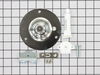
Lound noise inside dryer
1. unplug the dryer, remove the aluminum vent and move it to an area that has a lot of elbow room.
2. remove the top lid with a flat screwdriver. It seems that the top lid was being held by 2 metal clips on each end.
3. on the right hand side removed the 2 wires from the front face of the dryer. this is the switch for the open door sensor. remember which wire goes where.
4. the on the left and right side will be one screw and one metal clip, unscrew and pop the front panel with a flat screwdriver.
5. in front of the drum remove the plastic clip that is used as a guide for the drum to be in place.
6. look in the drum and there is 3 screws that form a triangle shape. remove the screws.
7. remove the belt from the drum. inspect the belt. replace if necessary.
8. lift up and pull out the drum.
9. remove the rear drum assembly and replace it with the new parts.
10. repeat in reverse and your done.
It took me 40 minutes the first time i replaced the rear drum assembly then i forgot to hook the belt up correctly and i unassemble the unit in 5 minutes fix the belt and assemble the unit in 5 more minutes. Now the wife is happy.
2. remove the top lid with a flat screwdriver. It seems that the top lid was being held by 2 metal clips on each end.
3. on the right hand side removed the 2 wires from the front face of the dryer. this is the switch for the open door sensor. remember which wire goes where.
4. the on the left and right side will be one screw and one metal clip, unscrew and pop the front panel with a flat screwdriver.
5. in front of the drum remove the plastic clip that is used as a guide for the drum to be in place.
6. look in the drum and there is 3 screws that form a triangle shape. remove the screws.
7. remove the belt from the drum. inspect the belt. replace if necessary.
8. lift up and pull out the drum.
9. remove the rear drum assembly and replace it with the new parts.
10. repeat in reverse and your done.
It took me 40 minutes the first time i replaced the rear drum assembly then i forgot to hook the belt up correctly and i unassemble the unit in 5 minutes fix the belt and assemble the unit in 5 more minutes. Now the wife is happy.
Parts Used:
-
Joseph from little Egg Harbour, NJ
-
Difficulty Level:Easy
-
Total Repair Time:1- 2 hours
-
Tools:Screw drivers
3 of 5 people
found this instruction helpful.
Was this instruction helpful to you?
Thank you for voting!
dryer heat did not work
The how to video was great. I had a little problem with getting the belt back on the pulleys. Not enough room for my hands. I did manage to get it back on ,and runs great
Parts Used:
-
Mark from HGHLNDS RANCH, CO
-
Difficulty Level:Easy
-
Total Repair Time:1- 2 hours
-
Tools:Screw drivers
2 of 2 people
found this instruction helpful.
Was this instruction helpful to you?
Thank you for voting!