




















JVM130KC02 General Electric Microwave - Instructions
Keep searches simple. Use keywords, e.g. "leaking", "pump", "broken" or "fit".
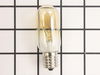
bad bulb
unscrewed cover, took old bulb out, screwed new bulb in.relaced cover.
Parts Used:
-
edward from schererville, IN
-
Difficulty Level:Really Easy
-
Total Repair Time:Less than 15 mins
-
Tools:Screw drivers
Was this instruction helpful to you?
Thank you for voting!
Burned out light bulb in the over-stove microwave
Removed the one phillips screw that holds the light lens in place, drop the lens down for access to the burned out bulb, screw in the new bulb, replace the lens.
Parts Used:
-
George from Arlington, TX
-
Difficulty Level:Really Easy
-
Total Repair Time:Less than 15 mins
-
Tools:Screw drivers
Was this instruction helpful to you?
Thank you for voting!
burnt out bulb /microwave
simply to install new bulb. Unscrewed the under the microwave lamp door with a screwdriver. Inserted new bulb into socket. good to go
Parts Used:
-
gerri from north haven, CT
-
Difficulty Level:Really Easy
-
Total Repair Time:Less than 15 mins
-
Tools:Screw drivers
Was this instruction helpful to you?
Thank you for voting!
replace micro/hood combo stove light
simply unscrewed protective lens cover, and swapped bulbs--these bulbs are great--last for years
Parts Used:
-
PATRICIA from ALEXANDRIA, VA
-
Difficulty Level:Really Easy
-
Total Repair Time:Less than 15 mins
-
Tools:Screw drivers
Was this instruction helpful to you?
Thank you for voting!
Over Stove Light Bulb Out
Took screw holding lens cover out, dropped cover down, unscrewed old bulb, screwed new bulb in socket. Screwed cover back in place. This is the third bulb in this socket, the other bulb is original.
Parts Used:
-
DALE from ST PETERSBURG, FL
-
Difficulty Level:Really Easy
-
Total Repair Time:Less than 15 mins
-
Tools:Screw drivers
Was this instruction helpful to you?
Thank you for voting!
Light bulb burned out
Easy as can be. Removed one screw on the glass cover, removed two burned out bulbs and reinstalled two new bulbs, reinstalled the cover and all is well now. The best part - my 'supervisor' is happy that she can see to cook again!
Parts Used:
-
Bob from La Crescenta, CA
-
Difficulty Level:Really Easy
-
Total Repair Time:Less than 15 mins
-
Tools:Screw drivers
Was this instruction helpful to you?
Thank you for voting!
light bulb below the over burned out
Getting the old bulb out of the socket was not an easy job as the factory seals the base of the bulb to the socket and for what reason I do not know. The seal has to be broken away to remove the bulb. I broke the seal with a knife and then proceeded to unscrew the bulb. The bulb at that point shattered in my hand and I was left with just the base of the bulb stuck in the socket. it took much effort to be able to work loose the base with a needle nose pliers and much sweat. The installation however went very smooth and Part Select did a fine job of sending me the right part in a very short period of time. They are a great source for any appliance part needed.
Parts Used:
-
Raymond from Walnut Creek, CA
-
Difficulty Level:Really Easy
-
Total Repair Time:Less than 15 mins
-
Tools:Screw drivers
Was this instruction helpful to you?
Thank you for voting!
lights under microwave (that we use as a kitchen night light went out.
undid plate exposing bulbs. Bulbs were blown to the extent that I could not see the size or wattage. Went to website, got the data ... including how to find the model and serial number plate, entered the info, looked at the exploded drawing, ordered 2 new bulbs and 3 days later they showed up at our door FedEX.
Parts Used:
-
JOHN from RIVERSIDE, IA
-
Difficulty Level:Really Easy
-
Total Repair Time:Less than 15 mins
-
Tools:Screw drivers
Was this instruction helpful to you?
Thank you for voting!
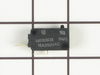
Unit would not come on.
removed access panal, found soft switch as discribed on your web site. removed and replaced.
Parts Used:
-
Phillip from Umatilla, FL
-
Difficulty Level:Really Easy
-
Total Repair Time:Less than 15 mins
-
Tools:Screw drivers
Was this instruction helpful to you?
Thank you for voting!
over-stove lights burned out, one fell apart while removing
Followed suggestion by previous poster to remove bottom panel...facilitated process well
Parts Used:
-
Nancy from Tempe, AZ
-
Difficulty Level:Easy
-
Total Repair Time:15 - 30 mins
-
Tools:Pliers, Screw drivers
Was this instruction helpful to you?
Thank you for voting!
Fan stayed running when door was open...all else working fine
First, unplug microwave. Unscrew two screws at top of microwave, slide grill cover left and remove. This allows access to single screw holding control panel. Remove this screw and lift up control panel to remove. Secondary door switch is black switch at lowest position. The switch is held in place by a lever in back and very hard to get to. Remove the wires plugged into the switch, then remove two screws holding the plastic switch mount that holds all three switches. These screws use a "star" type screwdriver. Once the plastic mount is free, lift it up, right, and tip it slightly to find the lever that will release the black secondary door switch (the lowest switch)...release the broken switch, snap the new switch in its place. Replace the plastic mount by lifting and replacing back into position and replace the two "star" screws. Now, replace the wires onto the new switch, and test operation. Replace control panel, and top grill. It goes faster than it writes...getting the old switch out through that difficult to reach lever was the hardest part...still less than thirty minutes.
Parts Used:
-
Marla from Arlington, TX
-
Difficulty Level:A Bit Difficult
-
Total Repair Time:15 - 30 mins
-
Tools:Screw drivers
Was this instruction helpful to you?
Thank you for voting!
Burned out lightbulbs.
Changing 2 lightbulbs is NOT ROCKRT SCIENCE. With a screw-driver, remove the under MW light lens, unscrew the 2 burned out light bulbs, and replace with 2 new quality light bulbs. Test out that both are lite and working as they should, replace the lens and you are done, Until you find out one of the new (made in Chins) light bulbs is burned out after about 6 hours of being lite, call the parts phonr number and order a new replace bulb.
Parts Used:
-
William from Bluffton, SC
-
Difficulty Level:Easy
-
Total Repair Time:15 - 30 mins
-
Tools:Screw drivers
Was this instruction helpful to you?
Thank you for voting!
totally broken off door handle
Used the putty knife to pry open the inside of the door, just like another gentleman did, that I read on this web site. Used the phillips head screw driver to remove the broken pieces left on the door, and replace with the new handle. Popped the back of the door in place, and finished. Very simple. Saved about $400. Love it when a plan comes together.
Parts Used:

-
Gary from Harvey, LA
-
Difficulty Level:Really Easy
-
Total Repair Time:15 - 30 mins
-
Tools:Screw drivers
Was this instruction helpful to you?
Thank you for voting!
Microwave light bulbs went out
Because the microwave is old and the bulbs, I believe, had never been changed I carefully tried to unscrew the bulb. However, when I went to unscrew the bulbs the end of the bulb broke off and remained in the socket. I used a few different tools then remembered that sometimes a raw potatoe can be used to unscrew the remainder of the bulb, but to no avail. Finally had to unscrew the whole underside of the microwave to remove the broken bulb. May I suggest that you have the socket face away from the wall to screw in the bulb instead of the socket pointing toward the wall. You need to know yoga just to manuver the bulb into the socket.
Parts Used:
-
Barbara from Wixom, MI
-
Difficulty Level:A Bit Difficult
-
Total Repair Time:15 - 30 mins
-
Tools:Pliers, Screw drivers
Was this instruction helpful to you?
Thank you for voting!
Light worked, timer and control pad worked, but no turntable, no heat, no noises of any sort, just didn't start up
It was a snap using the instructions given. The key is getting into the unit. I did have to use a multimeter to find the failed switch since there are two of that type.
Parts Used:
-
Timothy from Middletown, NJ
-
Difficulty Level:Really Easy
-
Total Repair Time:Less than 15 mins
-
Tools:Screw drivers, Wrench set
Was this instruction helpful to you?
Thank you for voting!