




















JB620GF4SA General Electric Range - Instructions
Keep searches simple. Use keywords, e.g. "leaking", "pump", "broken" or "fit".
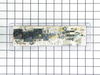
My electronic control board went out so I could not use my oven. My oven light blew as well.
I started with changing the bulb. I removed the small bracket that holds the glass cover over the bulb unscrewed the bulb and reversed to replace the bulb. To replace the control board I removed the top plate on the back of my stove took the small screw's out of the control panel and unplugged the wire's. Plugged the wire's into the right spots on the new control board and put it back together.
Parts Used:

-
Stella from PADUCAH, KY
-
Difficulty Level:Really Easy
-
Total Repair Time:Less than 15 mins
-
Tools:Pliers, Socket set
2 of 3 people
found this instruction helpful.
Was this instruction helpful to you?
Thank you for voting!
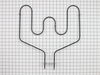
Bake element brokeand caught fire
Ordered the bake element part from partselect.com. When the part arrived I removed the 2 6mm screws from the element, I used two clips to hold the wires in place so that they didn't receed back into the stove. I installed the bake element, installed the two scews ans was done. It took all of 10minutes.
Lily in Florida
Lily in Florida
Parts Used:
-
Lillian from coral springs, FL
-
Difficulty Level:Really Easy
-
Total Repair Time:Less than 15 mins
-
Tools:Nutdriver
2 of 3 people
found this instruction helpful.
Was this instruction helpful to you?
Thank you for voting!
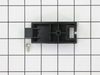
Broken rear drawer support
Installed the new brackets at the back of the drawer with the 2 screws provided. The new rear mount design is much better than than the old side mount.
Parts Used:
-
Jesse from Knob Noster, MO
-
Difficulty Level:Really Easy
-
Total Repair Time:Less than 15 mins
-
Tools:Nutdriver
2 of 3 people
found this instruction helpful.
Was this instruction helpful to you?
Thank you for voting!
The storage drawer came without supports.
I just removed the drawer and installed the rear supports as instructed on paper included with the part.
Parts Used:
-
Dock from Aurora, CO
-
Difficulty Level:Really Easy
-
Total Repair Time:Less than 15 mins
-
Tools:Nutdriver
2 of 4 people
found this instruction helpful.
Was this instruction helpful to you?
Thank you for voting!
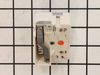
Could not adjust heat on burner.
Followed directions given by previous customers problems which we found on the internet.
Parts Used:
-
Roy from Au Gres, MI
-
Difficulty Level:Really Easy
-
Total Repair Time:Less than 15 mins
-
Tools:Nutdriver, Screw drivers
2 of 4 people
found this instruction helpful.
Was this instruction helpful to you?
Thank you for voting!
Element blew hole in self then no power to burner.
Replaced burned element, did not fix no power problem. Ordered receptor replacement, replaced it, took less than 10 mminutes, but still no power to burned. Then ordered replacement switch, replacement too less than 10 minutes again and burner works fine.
Parts Used:
-
Melvin from Portland, TN
-
Difficulty Level:Easy
-
Total Repair Time:Less than 15 mins
-
Tools:Screw drivers, Socket set
2 of 4 people
found this instruction helpful.
Was this instruction helpful to you?
Thank you for voting!
control switch had stopped working, burner wouldn't work properly
took out a couple of screws and replaced with new switch, plugged in switch wires. very easy
Parts Used:
-
Ruth from JACKSON, MO
-
Difficulty Level:Really Easy
-
Total Repair Time:Less than 15 mins
-
Tools:Screw drivers
1 person
found this instruction helpful.
Was this instruction helpful to you?
Thank you for voting!
Baking element broke
Opened the box removed old element with socket put new one in tightened and voila ?? Just in time for thanksgiving ??
Parts Used:
-
Veronica from PORT ORCHARD, WA
-
Difficulty Level:Very Easy
-
Total Repair Time:Less than 15 mins
-
Tools:Wrench set
1 person
found this instruction helpful.
Was this instruction helpful to you?
Thank you for voting!
Replaced oven door gasket
-
Paul from JACKSONVILLE, FL
-
Difficulty Level:Really Easy
-
Total Repair Time:15 - 30 mins
-
Tools:Screw drivers
1 person
found this instruction helpful.
Was this instruction helpful to you?
Thank you for voting!
THE FACE PLATE IS HARD TO GET OFF THE OLD CONTROL BOARD. USE A THIN KNIFE
THE INSTRUCTIONS THAT COME IN THE EMAIL ARE VERY GOOD. BE SURE TO TAKE A PICTURE OF THE WIRING.
Parts Used:
-
Melvin from WEBSTER, TX
-
Difficulty Level:Really Easy
-
Total Repair Time:15 - 30 mins
-
Tools:Nutdriver, Pliers
1 person
found this instruction helpful.
Was this instruction helpful to you?
Thank you for voting!
Bad Line fault displayed on range clock
1. Unplug the range power cord from the outlet.
2. Moved range away from the wall and countertop.
3.Using a nut driver removed the 2 screws on each side of the removable panel on the back side of the control knobs and clock.
4. Using a phillips head screwdriver remove 2 screws on top side of the back side panel.
5. Using a nut driver remove 4 screws that secure the main control board in place.
6. Take photo of the wiring on the main control board if not color coded.
7. My control board, and the replacement board were both color coded with the color with the wire placement on the rear of the board.
8. Remove wires with needle nose pliers.
9. Using a hair dryer, heat the plastic control panel face plate that fits onto the front of the old control board.
10.With a putty knife carefully pry the face plate from the old control board.
11. Install the control board face plate onto the new control board.
12. Install the color coded wiring in place on the back side of the control board.
13. Replace the control board into the range, and install screws, and rear panel of the range.
14. Plug cord into outlet and test range for proper operation.
2. Moved range away from the wall and countertop.
3.Using a nut driver removed the 2 screws on each side of the removable panel on the back side of the control knobs and clock.
4. Using a phillips head screwdriver remove 2 screws on top side of the back side panel.
5. Using a nut driver remove 4 screws that secure the main control board in place.
6. Take photo of the wiring on the main control board if not color coded.
7. My control board, and the replacement board were both color coded with the color with the wire placement on the rear of the board.
8. Remove wires with needle nose pliers.
9. Using a hair dryer, heat the plastic control panel face plate that fits onto the front of the old control board.
10.With a putty knife carefully pry the face plate from the old control board.
11. Install the control board face plate onto the new control board.
12. Install the color coded wiring in place on the back side of the control board.
13. Replace the control board into the range, and install screws, and rear panel of the range.
14. Plug cord into outlet and test range for proper operation.
Parts Used:
-
Vincent J Paola, from GREENWEL SPGS, LA
-
Difficulty Level:Very Easy
-
Total Repair Time:Less than 15 mins
-
Tools:Nutdriver, Screw drivers
1 person
found this instruction helpful.
Was this instruction helpful to you?
Thank you for voting!
oven door gasket needed replaced
Ordered the part, it arrived and 5 minutes later it a complete installation
Parts Used:
-
Mary from LONGS, SC
-
Difficulty Level:Very Easy
-
Total Repair Time:Less than 15 mins
1 person
found this instruction helpful.
Was this instruction helpful to you?
Thank you for voting!
Oven was very slow to heat
Removed the rear panel from the Range using the nut driver. pulled the terminal wires off the back of the heating element. Double checked if there was continuity across the heating element terminals before removing the element. If there is none, its bad. remove the two screws inside the oven holding the element in place. Once free, lift the front of the element to about 30 degrees and pull towards you. Insert the new element in the reverse manner then secure it using the two screws. Push the terminal wires onto the terminals on the back of the element and reinstall the rear panel.
Parts Used:
-
James from CANAL FULTON, OH
-
Difficulty Level:Very Easy
-
Total Repair Time:Less than 15 mins
-
Tools:Nutdriver
1 person
found this instruction helpful.
Was this instruction helpful to you?
Thank you for voting!
Back element was broken
My son did it by using pliers. He took out the screws that held the element in and pulled it out and used the pliers to pull the wires out of the old one and snapped the new one in . put it back together. about 5 minutes.
Parts Used:
-
Shiirley from CASPER, WY
-
Difficulty Level:Really Easy
-
Total Repair Time:Less than 15 mins
-
Tools:Pliers
1 person
found this instruction helpful.
Was this instruction helpful to you?
Thank you for voting!
Bake element was burnt out.
1.Disconnect the power cord. 2.Remove two screws pull the element out. 3.Disconnect the wires attach to element. 4. Install the new element connecting the wires. 5. Align element with holes and tighten screws. 6. Plug in power cord and begin to cook.
Parts Used:
-
Bertram from ABERDEEN, MD
-
Difficulty Level:Very Easy
-
Total Repair Time:Less than 15 mins
-
Tools:Socket set
1 person
found this instruction helpful.
Was this instruction helpful to you?
Thank you for voting!