




















DVM1850SM4SS General Electric Microwave - Instructions
Keep searches simple. Use keywords, e.g. "leaking", "pump", "broken" or "fit".
broken glass turntable
-
regan from oxford, MS
-
Difficulty Level:Really Easy
-
Total Repair Time:Less than 15 mins
2 of 3 people
found this instruction helpful.
Was this instruction helpful to you?
Thank you for voting!
Turntable coupler broke
I took the part out of the box and handed it to my wife and said "here ya go hun, go put this under the glass turntable in the microwave. You'll know it's installed when you hear it click down" She yelled back, "easy as pie" - - - Humm.. I can't make a pie. Fortunately the old one was in one piece as the side just split so it slid off very easy. The new one just snapped in place.
Parts Used:
-
Thomas from Savannah, TX
-
Difficulty Level:Really Easy
-
Total Repair Time:Less than 15 mins
3 of 6 people
found this instruction helpful.
Was this instruction helpful to you?
Thank you for voting!
Still runs even the door was open
Pulled it from the wall remove the front vent covers removed the control panel remove the door switches by a special screw driver bit which looks a star remove the electrical terminals pressed the plastic clip pulled the switch replaced it with new one then followed initial steps backward
Parts Used:
-
Erwin from CONROE, TX
-
Difficulty Level:Really Easy
-
Total Repair Time:30 - 60 mins
-
Tools:Pliers
2 of 3 people
found this instruction helpful.
Was this instruction helpful to you?
Thank you for voting!
microwave Quit working but lights worked
-
Rick from Muncie, IN
-
Difficulty Level:Really Easy
-
Total Repair Time:15 - 30 mins
-
Tools:Screw drivers
5 of 12 people
found this instruction helpful.
Was this instruction helpful to you?
Thank you for voting!
Microwave will not start
Removed three screws from the top front cover and slide it out and following I removed the touch panel and the housing that holds the switches and replaced the bad one.
Parts Used:
-
Carlos from GLENDALE, NY
-
Difficulty Level:Very Easy
-
Total Repair Time:15 - 30 mins
-
Tools:Nutdriver, Screw drivers
3 of 6 people
found this instruction helpful.
Was this instruction helpful to you?
Thank you for voting!
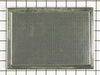
I was receiving message that charcoal filter needed replacing
I finally found the two screws to remove the fan opening. Once I did that I did not locate an OLD charcoal filter!! I just deducted there was never one in there, based on where the instructions said it should be located. I placed the new filter and let it "rest on an angle" as per the instructions I read from the diagram, and from the other peoples description online. I put the breaker back on and all seems fine!
Parts Used:
-
Sharon from BUDD LAKE, NJ
-
Difficulty Level:A Bit Difficult
-
Total Repair Time:15 - 30 mins
-
Tools:Screw drivers
2 of 3 people
found this instruction helpful.
Was this instruction helpful to you?
Thank you for voting!
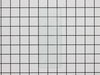
Previoous glass lens was broken
This repair was easy and could be done by anyone. If you undertake to do this replacement, remember to slowly bend the medal tabs back that hold the lens. Handled roughly these tabs could break off.
This repair can be don in under 5 minutes, easily !!
This repair can be don in under 5 minutes, easily !!
Parts Used:
-
Tommy from Santa clarita, CA
-
Difficulty Level:Really Easy
-
Total Repair Time:15 - 30 mins
-
Tools:Screw drivers
1 person
found this instruction helpful.
Was this instruction helpful to you?
Thank you for voting!
No problem in replacing the charcoal filter
I just followed your instructions that came with the filter removed the screws and slid the cover to the left
Parts Used:
-
WALTER from SEATTLE, WA
-
Difficulty Level:Really Easy
-
Total Repair Time:30 - 60 mins
-
Tools:Screw drivers
1 person
found this instruction helpful.
Was this instruction helpful to you?
Thank you for voting!
The coupler broke , glass turntable not turning
Received part installed in less than one minute, easy fix alignment of part in shaft pressing down into position
Parts Used:
-
Timothy from LAKE WALES, FL
-
Difficulty Level:Really Easy
-
Total Repair Time:30 - 60 mins
1 person
found this instruction helpful.
Was this instruction helpful to you?
Thank you for voting!
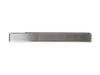
Broken top grill
removed remaining screw and old grill.
fitted new part - tabs on bottom rail did not line up with openings in main unit. had to cut the four tabs off. installed with two top rail screws.
fitted new part - tabs on bottom rail did not line up with openings in main unit. had to cut the four tabs off. installed with two top rail screws.
Parts Used:
-
edward from ARLINGTON HTS, IL
-
Difficulty Level:A Bit Difficult
-
Total Repair Time:30 - 60 mins
-
Tools:Pliers, Screw drivers
1 person
found this instruction helpful.
Was this instruction helpful to you?
Thank you for voting!
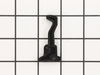
Broken Hook on Microwave Door
This particular model has 2 hooks that are separate.
1. Remove the plastic trim on the inside of the door. Use a spatula and be care not to break any of the snapping parts. It will come apart.
2. There will be a metal trim that needs to be removed in order to get to the "screw" or "rod" that holds the hook in place.
3. All around the metal trim, there are plastic snaps. Use a screw driver to release the snaps from the metal trim.
4. My metal trim did not want to fully be removed... I was able to release the side where the hooks were and the bottom snaps.
5. Use the needle nose pliers to remove the spring. I found it easier to remove the bottom part of the spring to free the hook.
6. I had to pull on the metal trim enough to get the rod out of the hook so the hook could be removed. Very difficult with one person, but I got it done.
7. Put the spring in the new hook before you install it.
8. Put the rod back in, then the hook, then through the right hole.
9. Attach the bottom of the spring back to the lower hole.
10. Snap the metal trim back onto the microwave door.
11. Snap the plastic trim back onto the door.
12. Move the hooks up and down and feel there is tension. This should probably be done after Step 9.
13. Breathe!!!!
1. Remove the plastic trim on the inside of the door. Use a spatula and be care not to break any of the snapping parts. It will come apart.
2. There will be a metal trim that needs to be removed in order to get to the "screw" or "rod" that holds the hook in place.
3. All around the metal trim, there are plastic snaps. Use a screw driver to release the snaps from the metal trim.
4. My metal trim did not want to fully be removed... I was able to release the side where the hooks were and the bottom snaps.
5. Use the needle nose pliers to remove the spring. I found it easier to remove the bottom part of the spring to free the hook.
6. I had to pull on the metal trim enough to get the rod out of the hook so the hook could be removed. Very difficult with one person, but I got it done.
7. Put the spring in the new hook before you install it.
8. Put the rod back in, then the hook, then through the right hole.
9. Attach the bottom of the spring back to the lower hole.
10. Snap the metal trim back onto the microwave door.
11. Snap the plastic trim back onto the door.
12. Move the hooks up and down and feel there is tension. This should probably be done after Step 9.
13. Breathe!!!!
Parts Used:
-
Barbara from GLENDALE, AZ
-
Difficulty Level:A Bit Difficult
-
Total Repair Time:30 - 60 mins
-
Tools:Screw drivers
1 person
found this instruction helpful.
Was this instruction helpful to you?
Thank you for voting!
the top plastic latch pawl broke
This microwave has two separate spring-loaded latch pawls. To get the broken latch pawl off and install the new one you first take off the rectangular plastic trim piece from the inside of the door to expose the pawls. There is a pin that secures the pawl in place. To get the pin out I had to carefully drill a regular hole bigger than the pin with the Dremel tool at the edge of the plastic door piece. I then could extract the pin with a small screwdriver or twizzers. The old pin and spring will come out and you reverse the procedure to install pawl and pin and connect spring. Then reinstall trim piece. I put a small piece of black electricians tape over the hole I made in the door edge. It doesn't show when door is closed and it blends well with the black plastic edge. Test to make sure microwave works and mine did after some carefully fitting of the trim piece.
Parts Used:
-
Tom from Mission, TX
-
Difficulty Level:A Bit Difficult
-
Total Repair Time:1- 2 hours
-
Tools:Pliers, Screw drivers
1 person
found this instruction helpful.
Was this instruction helpful to you?
Thank you for voting!
Error message on readout said to change the filter
First I removed the two screws that held the filter cover in place, lifted out the old and replaced it with the new filter. Put the filter cover back on and replaced the two screws that hold it in place, and it was done in less than 5 minutes.
Parts Used:
-
Bonnie from Vandalia, IL
-
Difficulty Level:Really Easy
-
Total Repair Time:Less than 15 mins
-
Tools:Screw drivers
1 person
found this instruction helpful.
Was this instruction helpful to you?
Thank you for voting!
Water dipenser valve leaking.
-
Lawrence from Cincinnati, OH
-
Difficulty Level:Really Easy
-
Total Repair Time:Less than 15 mins
2 of 4 people
found this instruction helpful.
Was this instruction helpful to you?
Thank you for voting!
Broken lens
remove two screws bend out flaps remove broken glass install new glas bend flaps back to hold glass install two screws. Done.
Parts Used:
-
Norman from Voorheesville, NY
-
Difficulty Level:Really Easy
-
Total Repair Time:Less than 15 mins
-
Tools:Screw drivers
1 person
found this instruction helpful.
Was this instruction helpful to you?
Thank you for voting!