




















CSA1201RSS05 General Electric Microwave - Instructions
Keep searches simple. Use keywords, e.g. "leaking", "pump", "broken" or "fit".
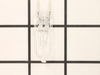
failed bulb
unscrew one screw and remove bulb and insert new bulb and replace lense with one screw-
as easy as it gets-
as easy as it gets-
Parts Used:
-
Billy from Palm Desert, CA
-
Difficulty Level:Really Easy
-
Total Repair Time:Less than 15 mins
-
Tools:Screw drivers
1 of 5 people
found this instruction helpful.
Was this instruction helpful to you?
Thank you for voting!
no night light
took out cover by removing cover. pulled out light bulbs replaced with new bulbs. replaced cover and tighten screw. very easy
Parts Used:

-
CURTIS from WINDSOR, WI
-
Difficulty Level:Really Easy
-
Total Repair Time:Less than 15 mins
-
Tools:Screw drivers
4 of 14 people
found this instruction helpful.
Was this instruction helpful to you?
Thank you for voting!
Had to replace to halogen lamps
Repair was simple; only a phillips head screw driver was required to remove the access plate.
Part Select delivered the replacement lamps within 3 days from the date I placed the order - great service.
Part Select delivered the replacement lamps within 3 days from the date I placed the order - great service.
Parts Used:
-
Lee from CUMMING, GA
-
Difficulty Level:Really Easy
-
Total Repair Time:Less than 15 mins
-
Tools:Screw drivers
1 of 6 people
found this instruction helpful.
Was this instruction helpful to you?
Thank you for voting!
Surface light bulbs burned out under microwave
Unscrew (one screw) and take off the cover of the surface light under the microwave (the light over the stove). Firmly pull out the old light bulbs. Align the two prongs of the new bulbs into the socket and firmly push into the recepticle. Replace the cover and screw.
Parts Used:
-
Thomas from Laguna Niguel, CA
-
Difficulty Level:Really Easy
-
Total Repair Time:Less than 15 mins
-
Tools:Screw drivers
1 of 7 people
found this instruction helpful.
Was this instruction helpful to you?
Thank you for voting!
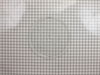
broken turntable
-
Bonnie from Lutz, FL
-
Difficulty Level:Really Easy
-
Total Repair Time:Less than 15 mins
Was this instruction helpful to you?
Thank you for voting!
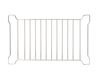
No rack in the Convection/Microwave
-
Maxine from Flagstaff, AZ
-
Difficulty Level:Really Easy
-
Total Repair Time:Less than 15 mins
Was this instruction helpful to you?
Thank you for voting!
Burned out bulbs
-
Arthur from Boynton Beach, FL
-
Difficulty Level:Really Easy
-
Total Repair Time:Less than 15 mins
-
Tools:Screw drivers
Was this instruction helpful to you?
Thank you for voting!
Both Nite lights burned out, again.
So simple, unscrew the hatch underneath the microwave oven, pull out old bulbs, and insert new.
Parts Used:
-
Karen from Berea, OH
-
Difficulty Level:Really Easy
-
Total Repair Time:Less than 15 mins
-
Tools:Screw drivers
Was this instruction helpful to you?
Thank you for voting!
Surface lights burned out
Opened the cover. Removed burned out bulbs. Ordered replacements which arrived fairly quickly. Forgot to turn off power to unit (didn't matter in the end!). Using the bubble wrap the new bulbs came in, I inserted the bulbs one by one into their respective sockets. Not really tricky but the surface light is in the back of the microwave so I had to lean over the stove to get all the way back. Once in the bulbs worked fine. Closed the cover. All back to normal.
Parts Used:
-
Robert from Las Cruces, NM
-
Difficulty Level:Really Easy
-
Total Repair Time:Less than 15 mins
-
Tools:Screw drivers
Was this instruction helpful to you?
Thank you for voting!
light bulbs burned out
Used screwdriver, removed cover, took out old bulbs and replaced with new ones. Couldn't get any easier.
Parts Used:
-
Kim from Poway, CA
-
Difficulty Level:Really Easy
-
Total Repair Time:Less than 15 mins
-
Tools:Screw drivers
Was this instruction helpful to you?
Thank you for voting!
broken glass tray
-
Lucrecia from Bothell, WA
-
Difficulty Level:Really Easy
-
Total Repair Time:Less than 15 mins
Was this instruction helpful to you?
Thank you for voting!
Light bulb replacement
Buying the bulb and doing the replacement my self was the best thing I had done. The same problem happened last year and I had the American Home shield insurance at that time so I called the company and they took three weeks between ordering and replacing the light, they showed me the final bill and it was $240.00....!!! This time I bought the light through partselect, got it within 48 hours and did he replacement myself within 15 min, I followed the instructions on the video and had to do an extra step ( due to the model I have) but I was able to replace the bulb and yooohooo it was working when I reconnect the power... I am a person who never tried to fix any electrical appliance before, but after this experience I will always try to do it myself... Believe me if I can do it and felt it was easy you can do it.... Thank you Partselect.... I can't speak high enough about you
Parts Used:
-
Fadel from Visalia, CA
-
Difficulty Level:Really Easy
-
Total Repair Time:Less than 15 mins
-
Tools:Screw drivers
Was this instruction helpful to you?
Thank you for voting!
Broken Glass plate.
No installation was required...I simply placed the glass plate replacement inside of my microwave oven.
Parts Used:
-
Ursula from Centennial, CO
-
Difficulty Level:Really Easy
-
Total Repair Time:Less than 15 mins
Was this instruction helpful to you?
Thank you for voting!
Quit working

-
William from Socorro, NM
-
Difficulty Level:Really Easy
-
Total Repair Time:Less than 15 mins
-
Tools:Pliers, Screw drivers
Was this instruction helpful to you?
Thank you for voting!
both lights burned out, used for 8 years or more
My daughter hand installed bulbs without a problem, took a minute and used a phillips to reinstall the cover. I shopped on-line because I wasted two hours between Lowe's and Home Depot trying to get the right bulb. I did think your postage was crazy high, otherwise glad to get the right bulbs to solve the problem.
Parts Used:
-
diana from lincoln, CA
-
Difficulty Level:Really Easy
-
Total Repair Time:Less than 15 mins
-
Tools:Screw drivers
Was this instruction helpful to you?
Thank you for voting!