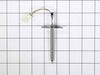
Having issues with your LG range? Try our Display PCB Assembly'it's a real game-changer. Specifically formulated for specific models in LG's oven range, this genuine OEM product guarantees a seamless match and snug fit with your appliance. So, what does it do? As the beating heart of your oven, this control board keeps a tight rein on the temperature. It carefully manages your oven's heat levels ensuring excellent performance every time you're up for some baking or roasting. The best part? You don't need a pro for this. Just remember to disconnect the oven or flip off the house circuit breaker for the range before you start. We advise using gloves to keep your hands safe during the process. The Display PCB Assembly reflects LG's dedication to pioneering design, superior quality, and fantastic functionality. So, restore your oven's performance today with this indispensable component. Trust us; your appliance will be good as new.
How Buying OEM Parts Can Save You Time and Money
Troubleshooting
This part works with the following products:
Range.
This part works with the following products:
LG.
Customer Repair Stories
Average Repair Rating: 3.3 / 5.0, 1 reviews.
What's this?
< Prev
1
Next >
Sort by:
Search filter:
Clear Filter
Your search term must have 3 or more characters.
Keep searches simple. Use keywords, e.g. "leaking", "pump", "broken" or "fit".
Sorry, we couldn't find any existing installation instruction that matched.
The LED display started losing sections over two years ago. Got to the point where it is illegible with just a few LED still working.
This is a gas stove with 110v electric. Unplug cord before beginning.
Remove back cover. There Phillip approx 15 Phillips screws. Back cover slides up off of tabs to remove .
You need to get the main board out of the way to get to the Display PCBA. There were three wiring harness connectors on the right side of the board you need to disconnect which allows the Board to slide out to the right. Use plastic pry bar to pop tabs slightly on top and right side of board that will allow you to slide the board out to the right. You need to take care to not break these tabs.
I did not disconnect the other wiring harnesses on left side of board. I lifted the board and laid it out of the way on the top of the back of stove. I held it in place with a piece of duct tape holding it to top by wiring harness to give me room.
Now you have access to the Display PCBA. This board is held in place by 5 screws. Remove screws and place new board in place with the 5 screws.
Now put the main board back in place by sliding in place from right to left and under the tabs on all sides. This is a little tricky but with a plastic pry bar and going slowly not to difficult. Be careful not to pinch wires behind the main board. There are relief openings that wiring should be routed through.
Plug the cord back in and make sure all is working on the Display and push buttons on front pad.
Finally place the back cover on and secure with screws.
Other Parts Used:
Robert from Irwin, PA
Difficulty Level:
Easy
Total Repair Time:
30 - 60 mins
Tools:
Screw drivers
4 of 4 peoplefound this instruction helpful.
Was this instruction helpful to you?
Thank you for voting!
< Prev
1
Next >
Questions and Answers
We're sorry, but our Q&A experts are temporarily unavailable.
Please check back later if you still haven't found the answer you need.
5 questions answered by our experts.
< Prev
1
Next >
Sort by:
Search filter:
Clear Filter
Your search term must have 3 or more characters.
Keep searches simple. Use keywords, e.g. "leaking", "pump", "broken" or "fit".
Sorry, we couldn't find any existing answers that matched.Try using some different or simpler keywords, or submit your new question by using the "Ask a Question" button above!
John
January 13, 2025
I purchased a replacement control board due to one of the segments failing g in the clock however with the new board the clock set function does not work. All other functions operate properly.
Is there something I can do to get the clock set?
For model number LRGL5823S
Hello John, Thank you for contacting us. If no other keys are pressed within 25 seconds of pressing Clock, the display reverts to the original setting, as you need to hit start after setting the time. If that does not fix the issue, check the wiring and see if there are any obstructions on the back of the overlay. We hope this helps.
Was this helpful?
Thank you for voting!
Tammy
November 11, 2025
The numbers on my display clock panel do not come through properly so when I go to set the temperature, I can’t see what it is set at. I just bought the. https://www.partselect.ca/PS16223754-LG-EBR89296402-Display-Printed-Circuit-Board-Assembly.htm?utm_source=transactional&utm_medium=email&utm_campaign=OutForDelivery…. I’m a little worried I didn’t buy the right part?
For model number LRGL5823S
Hi Tammy, thank you for reaching out. The part you have mentioned is the correct one for your model. We hope that helps!
Was this helpful?
Thank you for voting!
Robert
November 19, 2024
Dose this control panel come with the clock
For model number LRGL5823S
Hi Robert, Thank you for reaching out. The PCB Display includes the Clock Control. We hope this helps!
Was this helpful?
Thank you for voting!
William
October 20, 2025
Issues with my oven heating up owned it for about 1.5yrs. Any idea air fry dont work barely heats up. It's a fight to get it to temperature.
For model number LRGL5823D
Hi William, thank you for reaching out. We would suggest checking the oven temperature sensor, part number PS11732697. You may need to replace it to fix the issue. We hope this solves your problem!
Display missing number segments, can’t set temperature
For model number LRGL5823D
Hi Tracy, thank you for your inquiry. You will need to replace the control board with display, part number PS16223754, to fix the issue. Glad to be of help!
Fresh Flow Produce Preserver is made for your refrigerator to help keep produce fresh for longer by absorbing the chemical, ethylene, that causes your fruits and vegetables to ripen quicker. Your produce could be fresh f...
Having a problem with a funky-smelling washing machine, or one that just doesnt seem to clean your clothes as well as it used to? Say hello to the Affresh Washing Machine Cleaner by Whirlpool. This powerful washing helpe...
Affresh dishwasher Cleaner is specially formulated to help remove limescale and mineral build-up that can be unsightly and could affect your dishwasher's performance. Each tablet is designed to clean inside your machine ...
Make your cooktop shine with Frigidaire ReadyClean Glass and Ceramic Cleaner. Our scratch-free, streak-free formula removes smudges, grease, burnt-on food, dirt and oil, while protecting and polishing to repel dust and d...
[{"position":0,"name":"Home","title":"Home","url":"/"},{"position":1,"name":"Circuit Board or Touch Pad","title":"Circuit Board or Touch Pad","url":"/Range-Circuit-Boards-and-Touch-Pads.htm"},{"position":2,"name":"EBR89296402","title":"EBR89296402","url":""}]