




















TC400 Jenn-Air Trash Compactor - Instructions
Keep searches simple. Use keywords, e.g. "leaking", "pump", "broken" or "fit".
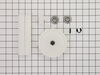
compactor wouldn't compact
bought new gears, pulled it out and replaced the gears. wasn't very hard. I did expect a jenn-air to be better built (plastic gears really!) but for 30 bucks it is all better.
Parts Used:
-
Tena from Parker, CO
-
Difficulty Level:Easy
-
Total Repair Time:15 - 30 mins
-
Tools:Screw drivers
Was this instruction helpful to you?
Thank you for voting!
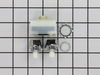
broken rotary switch
remove drawer remove two phillip screws lift off front panel remove wiring and plug into new switch.slide switch through the hole in panel install nut reinstall panel screws and drawer job done.
Parts Used:
-
john from red bluff, CA
-
Difficulty Level:Really Easy
-
Total Repair Time:15 - 30 mins
-
Tools:Pliers, Screw drivers
Was this instruction helpful to you?
Thank you for voting!
Compactor would travel down at the bottom of its range would just rumble like a Jack hammer until I unplugged
Looking at the information I found online it was either one of 2 things the directional switch was bad, or the drive gear was broken. I replaced the directional switch 1st since that was the easiest and that did not solve my problem. I put it all back together and thought about it for a little while. After a couple of days. It occurred to me that I could see the ramrod's spinning as the plunger goes down, then when the plunger reached as far as it would go. The ramrod's would stop spinning. I reasoned that the problem had to be somewhere between the motor and those rods when I opened up the bottom of the trash compactor, Iran the cycle again and I could see that the drive gear was still spinning, but the chains to the ramrod's were not spinning. Once I saw that I realized that the sprocket that was attached to the drive gear had broken. The sprocket is metal and the drive gear is plastic and they fit together perfectly, but through age or stress. The plastic have become rounded and no longer fit perfect on that nut when you applied a good deal of pressure. I didn't have the tool that I needed to replace the small drive year. I think you need some kind of a punch to get that pin out. So I left that one in place loosened the nuts that hold the motor in place to create some slack in the chain chain came off the new drive gear one on. I tightened the motor back up in the correct position is reassembled everything and it's working perfect again.
Parts Used:

-
Richard from Stow, MA
-
Difficulty Level:A Bit Difficult
-
Total Repair Time:15 - 30 mins
-
Tools:Screw drivers, Socket set
Was this instruction helpful to you?
Thank you for voting!
Primary Power Transfer Gear Split in Half
Compactor ram was stuck in the down position after hearing a loud bang during a compacting cycle. Removed outer compactor casing to determine cause, only to find gear housing underneath the compactor that contained drive chain and gear assembly. Primary gear had split neatly in half. Determined the appropriate part needed with partselect part finder (of course, an entire kit, and not just the gear), had part shipped and had compactor repaired in three days. The actual repair and reassembly of the compactor took less than a half-hour. Consisted of removing chain tension from gear hub by loosening four sheet metal screws holding motor assembly, removing circlip and old gear hub from chain and shaft, replacing gear hub with new part, lubricating the gear mechanism, and reinstalling in reverse order.
Parts Used:
-
Robert from Willow Creek, CA
-
Difficulty Level:Really Easy
-
Total Repair Time:15 - 30 mins
-
Tools:Nutdriver, Pliers, Screw drivers
Was this instruction helpful to you?
Thank you for voting!
Unit cycled when on switch operated and would not stop until Off switch was activated.
Replaced the limit switch. This did not alter the problem. Took off the On/Off/Start switch and dissasembled. I found the the Start switch was stuck in the on position. I reassembled the switch mechanism assuring that the Red "ON" indicator moldings were correctly positioned and reassembled everything. The Compactor now works properly. Need to add "Check the Start switch" to diagnosis.
Parts Used:
-
Gerald from Wickenburg, AZ
-
Difficulty Level:Really Easy
-
Total Repair Time:15 - 30 mins
-
Tools:Nutdriver, Pliers, Wrench (Adjustable)
Was this instruction helpful to you?
Thank you for voting!
minor replacement

-
Rhonda from ODESSA, TX
-
Difficulty Level:Really Easy
-
Total Repair Time:Less than 15 mins
-
Tools:Screw drivers
Was this instruction helpful to you?
Thank you for voting!
stripped pinion gear
I took the hex screws out with a nut driver and then punched out the role pin in the pinion gear (the little gear) and replaced it along with the large gear, less than 15 minutes. I was surprised how fast (day and a half) the parts were here.
Parts Used:
-
jeff from lincoln, AR
-
Difficulty Level:Really Easy
-
Total Repair Time:Less than 15 mins
-
Tools:Nutdriver
Was this instruction helpful to you?
Thank you for voting!
Ram was stuck in the down position
-
Joseph N from Wheaton, IL
-
Difficulty Level:Really Easy
-
Total Repair Time:15 - 30 mins
-
Tools:Nutdriver
Was this instruction helpful to you?
Thank you for voting!
Ram stuck in down poaition
Replaced drive gears.They arrived in a kit from Parts Select with instructions.They fit perfectly and the compactor works like new.
Parts Used:
-
Candace from Ocala, FL
-
Difficulty Level:Really Easy
-
Total Repair Time:15 - 30 mins
-
Tools:Wrench set
Was this instruction helpful to you?
Thank you for voting!
20+ plactic gears striped them selfs who da thunk
took longer to pull it out and put it backunder the counter then to pull the panel take the chane gear & drive gear off and put it back together
Parts Used:
-
Fred from Belmont, NH
-
Difficulty Level:Really Easy
-
Total Repair Time:Less than 15 mins
-
Tools:Nutdriver
Was this instruction helpful to you?
Thank you for voting!
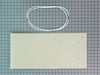
compactor was crushing the bag holder
easy ... got the new bag holder and replaced old one. the impressive part of the process is how easy it was to get the part info from partselect website. could have spun my wheels a lot without that.
Parts Used:
-
Myles from Jackson, NH
-
Difficulty Level:Really Easy
-
Total Repair Time:Less than 15 mins
Was this instruction helpful to you?
Thank you for voting!
the switch did not click off
very easy to fix. all it took was pulling the compactor out to unplug,take off the removable front nob, unscrew two screws located just below the front panel.using needle nose pliers to remove the actual switch, unplug the wires conected to the switch and put the new one on the same way. It almost took me longer to write this discription than it took to fix!
Parts Used:
-
janie from mcHenry, IL
-
Difficulty Level:Really Easy
-
Total Repair Time:Less than 15 mins
-
Tools:Pliers, Screw drivers
Was this instruction helpful to you?
Thank you for voting!
the compactor was stuck in the down position
Had to first raise the screw plate that compacts the garbage. Then had to turn the compactor over and remove screws holding the bottom plate on in order to get to the gears. Once that was done I removed the worn gears and the chain drive and replaced with the new gears and the chain. Put the unit back together and works like a new one. A $35 dollar fix for a unit that sells for around $900 today. Thanks to partslect for being able to help me with the parts needed. Not only did I save on a new unit but by doing this myself I saved around $100 in labor charges.
Parts Used:
-
Rod from Quincy, IL
-
Difficulty Level:Easy
-
Total Repair Time:15 - 30 mins
-
Tools:Screw drivers, Socket set
Was this instruction helpful to you?
Thank you for voting!
Directional Switch lever broke
The part was suppose to come with instructions, but did not. However, it was easy after reading the comments on-line, and discovering that the front cover had to be removed in order to expose the whole switch and wires. I did drop one of the mounting screws down the front of the compactor and was not able to recover it. So, I had to make a trip to the hardware store for a replacement. They couldn't match the remaining screw but I found 2 similar ones with lock washers and nuts that worked just fine. I saved a $90 service charge and probably double the cost of the switch by doing it myself.
Parts Used:
-
Dick from Penn Valley, CA
-
Difficulty Level:Easy
-
Total Repair Time:15 - 30 mins
-
Tools:Nutdriver, Screw drivers
Was this instruction helpful to you?
Thank you for voting!
Compacting part would not move correctly
The part that doews the actual compacting would not move correctly. The machine would not stop because the part never contacted the spring loaded switch. I had known about this for about a year, but put it off until it stopped working altogether. I ordered 2 power nuts and rec'd them in B.F.E. Alaska in about 5 days. I quickly replaced the parts and the machine works like brand new again. I estimate this compactor to be at least 10 -15 years old and replacing the occassional part once in awhile is a lot cheaper than buying a new compactor.
Parts Used:

-
John from Anchor Point, AK
-
Difficulty Level:Really Easy
-
Total Repair Time:15 - 30 mins
-
Tools:Screw drivers, Socket set
Was this instruction helpful to you?
Thank you for voting!