




















PEM1050DM1BB General Electric Microwave - Instructions
Keep searches simple. Use keywords, e.g. "leaking", "pump", "broken" or "fit".
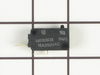
When opening door the microwave would turn on.
Watched How to repair a Microwave that turns on when the door is opened Video on the web. From this took a shot at the switch was the problem. When I removed the switch it was defective. The small button was in and when you turned the switch upside down the button would drop back into position. Ordered a switch for $25.oo , installed it and the microwave is working fine.
Parts Used:
-
Clarence from Rocky Ridge, OH
-
Difficulty Level:Really Easy
-
Total Repair Time:15 - 30 mins
-
Tools:Screw drivers
Was this instruction helpful to you?
Thank you for voting!
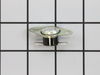
Started with a burning smell and eventually no operation at all.
Took the screws out that held the oven case on. Looked around and found a connection on the oven cavity thermal cut out the plastic melted and black looking. I knew this was the problem but I checked the fuse anyway and the fuse was good, so I ordered the part from part select and they shipped it out fast and now my microwave is working again.
Parts Used:
-
Butch from Gulfport, MS
-
Difficulty Level:Really Easy
-
Total Repair Time:15 - 30 mins
-
Tools:Screw drivers
Was this instruction helpful to you?
Thank you for voting!
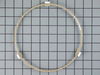
One of the rollers on my turntable guide became squared so that the roller wheel would not turn.
I opened the box, took the turntable guide out and put it under the microwave plate.
Parts Used:
-
Nancy from Inverness, IL
-
Difficulty Level:Really Easy
-
Total Repair Time:Less than 15 mins
Was this instruction helpful to you?
Thank you for voting!
Light worked, timer and control pad worked, but no turntable, no heat, no noises of any sort, just didn't start up
It was a snap using the instructions given. The key is getting into the unit. I did have to use a multimeter to find the failed switch since there are two of that type.
Parts Used:
-
Timothy from Middletown, NJ
-
Difficulty Level:Really Easy
-
Total Repair Time:Less than 15 mins
-
Tools:Screw drivers, Wrench set
Was this instruction helpful to you?
Thank you for voting!
Oven Cavity Thermal Cutout Open
Remove cover-the hardest part, as I needed to buy a new set of driver bits that included the dimpled security drivers to remove three screws. GE includes schematic and troubleshooting flow chart with the unit, taped inside the cover. Required more time to look up the part on-line and order it than time used to make the repair.
Parts Used:
-
Marion from Coupeville, WA
-
Difficulty Level:Really Easy
-
Total Repair Time:Less than 15 mins
-
Tools:Screw drivers
Was this instruction helpful to you?
Thank you for voting!
Microwave would not turn on
I removed the cover this required a special star Apex tip witha hole in the center. $10 for a set at Lowes.Replaced the fuse and Thermal cut out at the same time. The oven woks like a charm.I would like to add that GE customer service was no help basically told me that it was a throw away unit. If they built it you can fix it.Hope this helps any DIY breathern outthere.
Parts Used:
-
Bill from Lexington Park, MD
-
Difficulty Level:Really Easy
-
Total Repair Time:Less than 15 mins
-
Tools:Screw drivers
Was this instruction helpful to you?
Thank you for voting!
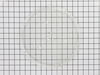
Broke glass plate cooking tray in microwave
-
Jan from Los Gatos, CA
-
Difficulty Level:Really Easy
-
Total Repair Time:Less than 15 mins
Was this instruction helpful to you?
Thank you for voting!
lost roller turntable guide
Installed new one. I do not know if these rings can be repaired
Parts Used:
-
ruth from pawleys island, SC
-
Difficulty Level:Really Easy
-
Total Repair Time:Less than 15 mins
Was this instruction helpful to you?
Thank you for voting!
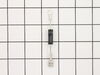
Not heating
Removed the above stove microhood. Removed the side panels & the top panel. Diode located on right hand side of microwave. Removed with screwdriver & replaced new diode. It's best to get the microwave schematic online to pinpoint location of the part.
Parts Used:
-
Debra from Concord, CA
-
Difficulty Level:Easy
-
Total Repair Time:Less than 15 mins
-
Tools:Nutdriver, Screw drivers
Was this instruction helpful to you?
Thank you for voting!
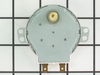
turn table motor failed
1. Using wire cutters, cut out sheet metal cover over motor on oven bottom. The stamped bottom is retained by the four corners which were not cut in the stamping. 2. Remove and replace motor. 3. Replace motor cover with supplied screw. (failure symptoms: turn table vibrated before it stopped completely.)
Parts Used:
-
Joe from Prescott, AZ
-
Difficulty Level:Easy
-
Total Repair Time:Less than 15 mins
-
Tools:Pliers, Screw drivers
Was this instruction helpful to you?
Thank you for voting!
Broken plate in microwave
I slipped the new saucer out of the box and placed it in the microwave. I was very disappointed to discover that the new one didn't fly like the old one.
Parts Used:
-
Patrick from Charlotte, NC
-
Difficulty Level:A Bit Difficult
-
Total Repair Time:Less than 15 mins
Was this instruction helpful to you?
Thank you for voting!
Display dead. Microwave appears like it isn't plugged in.
Removed cover. Found oven flame thermal cutout and measured across the terminals with an ohmmeter. Found no continuity. Thermal cutout wasn't allowing a complete path for input line. Ordered the oven cutout and 2 days later I installed the new part, re-assembled the oven cover and Voila! Fixed. Simple repair saved my friend from having to purchase a new microwave.
Parts Used:
-
Wayne from Elkton, FL
-
Difficulty Level:Really Easy
-
Total Repair Time:15 - 30 mins
-
Tools:Screw drivers
Was this instruction helpful to you?
Thank you for voting!
Oven failed to heat food.
Remove the microwave cover. Requires a phillips screwdriver and a torx security bit/nut driver (there are two security type screws on the back...guess they don't want you to do this at home!). I had to buy the a security bit set (about $7). The diode is easily accessible on the right side under the fan. Requires removing on small phillips screw and unplugging on electrical connection. GE provides some instructions in an envelope on top (after cover removed). There is a warning/instruction to discharge the capacitor before service. This was not a problem for me. Actual diode replacement took 30 seconds. Whole job = 15 minutes.
Parts Used:
-
Jeffrey from Gaithersburg, MD
-
Difficulty Level:Easy
-
Total Repair Time:15 - 30 mins
-
Tools:Nutdriver, Pliers, Screw drivers
Was this instruction helpful to you?
Thank you for voting!
No display
I had a bad cut off sensor on oven cavity I ran the Microwave with nothing in it and it smoked I ran it for another 6 months then 1 day I was heating water and it stop- working. I put a new tube in might be Okay but I was not going to risk it taking another cut off sensor on overload. You have to change sensor and put on a new tube. Clearly it would be cheaper to buy a new unit but it was only 2 years old and I am an old tech and was curious. The sensor cost only 16 bucks new tube about 55 a replace brand new oven 81 bucks there you have it I was stubborn and going to get that sucker back into operation I had another oven go out the same way
Parts Used:
-
Dan from Middleburg Hts, OH
-
Difficulty Level:Really Easy
-
Total Repair Time:15 - 30 mins
-
Tools:Pliers, Screw drivers
Was this instruction helpful to you?
Thank you for voting!