




















PB900DP2BB General Electric Range - Instructions
Keep searches simple. Use keywords, e.g. "leaking", "pump", "broken" or "fit".
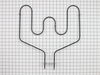
Replaced bottom burner
So easy. Took extra time so the wife would think it was harder. Just read the other reviews for instructions. Didn't have an issue with the wires pulling back into the oven though I did have my "clips" ready.
Parts Used:
-
Frank from Raleigh, NC
-
Difficulty Level:Really Easy
-
Total Repair Time:Less than 15 mins
-
Tools:Socket set
1 of 2 people
found this instruction helpful.
Was this instruction helpful to you?
Thank you for voting!
Melted bake element
Pulled out stove. Removed rear panel, and set aside. Removed melted bake element by unscrewing the mounting plate screws, and unplugging both leads from the stove. Replaced in reverese fashion. Easiest electrical replacement I have done.
Parts Used:
-
Kevin from Marion, AR
-
Difficulty Level:Really Easy
-
Total Repair Time:Less than 15 mins
-
Tools:Screw drivers
1 of 2 people
found this instruction helpful.
Was this instruction helpful to you?
Thank you for voting!
While making supper, we realized the bottom heating element wasn't working.
We decided to go "on line" to see if there was any way to fix the stove ourselves and found the Part Select website. After entering the model number for the stove, we were able to find the heating element. We ordered it and received it two days later! We saved money and time. Thank you!
Parts Used:
-
Johanna from Charlton, MA
-
Difficulty Level:Really Easy
-
Total Repair Time:15 - 30 mins
-
Tools:Nutdriver
1 of 3 people
found this instruction helpful.
Was this instruction helpful to you?
Thank you for voting!
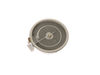
Heating element burned out
-
William from CONCORD, MA
-
Difficulty Level:Very Easy
-
Total Repair Time:30 - 60 mins
-
Tools:Pliers, Screw drivers
1 of 3 people
found this instruction helpful.
Was this instruction helpful to you?
Thank you for voting!
Bake element would not get hot
SHUT OFF THE BREAKER! Remove two (2) screws from the inside of the oven. Remove the five (5) screws on the back cover on the outside. Pull the wires from the spade terminals on the element (take note of the Red and White sides). Slide out the old element and slide in the new one from the oven side. Button up your screws and reset your breaker. Game over, bake a pie.
Parts Used:
-
Tim from Groton, CT
-
Difficulty Level:Really Easy
-
Total Repair Time:Less than 15 mins
-
Tools:Nutdriver
0 of 1 people
found this instruction helpful.
Was this instruction helpful to you?
Thank you for voting!
Broken Lower Bake unit
Turn off power at breaker 2.Remove two screws and pull out wire just about 3 to 4 inches so I could remove each side of clips. 3 clip the new bake unit to wires and screw the new unit back in to existing holes.4 Turn on breaker and start oven. I did it in less than 15 min it took longer to find my tools.
Parts Used:
-
Bill from Bozeman, MT
-
Difficulty Level:Really Easy
-
Total Repair Time:Less than 15 mins
-
Tools:Socket set
0 of 1 people
found this instruction helpful.
Was this instruction helpful to you?
Thank you for voting!
Burnt Out Oven Baking Element
First of all i ordered the part and recieved it the following day, thank you PartSelect. :) Installation was a breeze. I just turned off the main circuit breaker then pulled the range out from its position between the countertops. I used an adjustable wrench to remove two small bolts holding the baking element in place, carefully pulled out the element to expose the two wires, disconnected them and connected the new element, put the backplate bolts back in turned on the main breaker and the oven worked as good as new.
Parts Used:
-
Joseph from Omaha, NE
-
Difficulty Level:Really Easy
-
Total Repair Time:15 - 30 mins
-
Tools:Wrench (Adjustable)
0 of 1 people
found this instruction helpful.
Was this instruction helpful to you?
Thank you for voting!
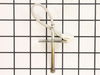
oven was not getting up to temp
Once I opened up the back of the range, the sensor wires where there and burnt just like your info said. One nut to take off in the oven and the sensor came right out and the new one went right in. The oven works great, cooked the turkey today. The worst part of the repare was the cleaning behind and under the range, it hasn't moved since it was put in 6 years ago. Very pleased with PS.
Parts Used:
-
walter from townshend, VT
-
Difficulty Level:Really Easy
-
Total Repair Time:Less than 15 mins
-
Tools:Nutdriver
0 of 1 people
found this instruction helpful.
Was this instruction helpful to you?
Thank you for voting!
Oven element burned out
This was my first attempt at an appliance repair. The job did nit look too difficult so I thought I would give it a try. The most important thing I can recommend is to have some type of clips to hold the wires after disconnecting the old element. As soon as you disconnect the wire, it retracts into the insulation. My job became more difficult and required pulling out the stove, removing the rear panel, and now needing a second person to push the wires back Into the oven. What should have been a 15 minute job now was a 30 minute procedure. Keep in mind that when you pull a stove out you now have to get the cleaning supplies out also. Word to the wise:USE THOSE PLASTIC SNACK BAG CLIPS! To hold the end of the wires.
Parts Used:
-
Richard from South Hadley, MA
-
Difficulty Level:Easy
-
Total Repair Time:15 - 30 mins
-
Tools:Nutdriver
0 of 1 people
found this instruction helpful.
Was this instruction helpful to you?
Thank you for voting!
The Bottom Heating Element was out
Took two screws out, unplugged the wires.
Put the new heating element in. Plugged in the wires and put the screws back.
Took about 16 minutes !
Put the new heating element in. Plugged in the wires and put the screws back.
Took about 16 minutes !
Parts Used:
-
Robert from Denver, CO
-
Difficulty Level:Really Easy
-
Total Repair Time:15 - 30 mins
-
Tools:Socket set
0 of 1 people
found this instruction helpful.
Was this instruction helpful to you?
Thank you for voting!
Bottom heating element burned itself out
First I pulled stove out away from wall and unplugged the power cord then I removed the oven door to make repair much easier. I removed the two screws holding the heating element in place. I then went behind stove and unscrewed four screws to remove panel covering the electrical connections. Disconnected wires to heating element. Removed old element and reversed each step to connect new element.
Parts Used:
-
Kevin from Peoria, AZ
-
Difficulty Level:Really Easy
-
Total Repair Time:30 - 60 mins
-
Tools:Nutdriver
0 of 1 people
found this instruction helpful.
Was this instruction helpful to you?
Thank you for voting!
Bottom Oven Bake Element had burnt out/broke.
First- I slid the ove out and unscrewed the back metal piece/flap that covers where the element attaches to wires.
Second- I unscrewed the two nuts/screws that holld the element in place-An appropriately sized socket wrench would have made it way easier.
Third-Before pulling the element out, I disconnected the wire connection-the element tab just slid out of the connector.
Fourth- Pull out the old element and replace with new one. Attach wires before screwing in the element place holders.
Fifth-Replace back cover and screws. slide oven back into its nook,
Sixth-Bake some cookies.
Second- I unscrewed the two nuts/screws that holld the element in place-An appropriately sized socket wrench would have made it way easier.
Third-Before pulling the element out, I disconnected the wire connection-the element tab just slid out of the connector.
Fourth- Pull out the old element and replace with new one. Attach wires before screwing in the element place holders.
Fifth-Replace back cover and screws. slide oven back into its nook,
Sixth-Bake some cookies.
Parts Used:
-
Adam from Charlotte, NC
-
Difficulty Level:Easy
-
Total Repair Time:15 - 30 mins
-
Tools:Pliers
0 of 1 people
found this instruction helpful.
Was this instruction helpful to you?
Thank you for voting!
Bake Element burnt out
First my husband removed the two screws that hold the element in place. Then pulled the element out and diconnected the two wires. The wires popped back in, so he took the shield off the back, I pushed the element in so he could see the prongs and hooked the wired back on. He then replaced the 2 screws and i was back to baking.
Thanks
Thanks
Parts Used:
-
Juli from Lake City, MN
-
Difficulty Level:Really Easy
-
Total Repair Time:15 - 30 mins
-
Tools:Socket set
0 of 1 people
found this instruction helpful.
Was this instruction helpful to you?
Thank you for voting!
Bake unit burned through had to replace
Read posts on this site by others who did the same repair and found that to be a great help especially since the part came with out instructions.
From the posts I was expecting the wires to be short and had vice grips available to stop them from sliding back through the insulation. One still did though. I took off the back plate and pushed it back through. Piece of cake. The clips on the end of the wires were pretty loose and I used some needle nose to crimp them down. I also made sure to unplug the oven prior to starting.
From the posts I was expecting the wires to be short and had vice grips available to stop them from sliding back through the insulation. One still did though. I took off the back plate and pushed it back through. Piece of cake. The clips on the end of the wires were pretty loose and I used some needle nose to crimp them down. I also made sure to unplug the oven prior to starting.
Parts Used:
-
Luke from Highlands Ranch, CO
-
Difficulty Level:Easy
-
Total Repair Time:15 - 30 mins
-
Tools:Socket set, Wrench (Adjustable)
0 of 1 people
found this instruction helpful.
Was this instruction helpful to you?
Thank you for voting!
oven wouldn't heat
irst I removed the two screws that hold the element in place. I then pulled the element out about 3 inches and disconnected the two wires...)
Parts Used:
-
Dorothy from Wapakoneta, OH
-
Difficulty Level:Easy
-
Total Repair Time:15 - 30 mins
-
Tools:Screw drivers, Socket set
0 of 1 people
found this instruction helpful.
Was this instruction helpful to you?
Thank you for voting!