




















JNM1541DP1WW General Electric Microwave - Instructions
Keep searches simple. Use keywords, e.g. "leaking", "pump", "broken" or "fit".
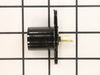
Microwave light bulb glass broke in socket and could not be removed from socket.
Simply unscrew the bottom panel of the microwave device (it swings downward when opening - there are hinges on the back to protect it from falling down). Remove the old light socket (which is modular and is screwed in place)from the connectors and then replace it with the new light socket. That's it
Parts Used:
-
Juan from Los Angeles, CA
-
Difficulty Level:Really Easy
-
Total Repair Time:Less than 15 mins
-
Tools:Screw drivers
Was this instruction helpful to you?
Thank you for voting!
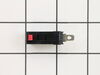
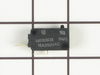
would not turn on - plug in and would shut off right away
-
Vita from Flagstaff, AZ
-
Difficulty Level:Easy
-
Total Repair Time:Less than 15 mins
-
Tools:Screw drivers
Was this instruction helpful to you?
Thank you for voting!
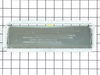
Converted an over the range microwave from non vented ductless to outside vent.
Installation of the damper was effortless but removing the microwave, cutting holes vertically through an overhead cabinet then installing ducting with a ninety degree bend, through another cabinet, and then through outside wall consumed most of the time and effort.Your service, packaging, and timely (next day!) were extremely helpful.
Parts Used:
-
Emanuel from Woodstock, VA
-
Difficulty Level:A Bit Difficult
-
Total Repair Time:More than 2 hours
-
Tools:Screw drivers
Was this instruction helpful to you?
Thank you for voting!
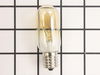
Over Stove Light Bulb Out
Took screw holding lens cover out, dropped cover down, unscrewed old bulb, screwed new bulb in socket. Screwed cover back in place. This is the third bulb in this socket, the other bulb is original.
Parts Used:
-
DALE from ST PETERSBURG, FL
-
Difficulty Level:Really Easy
-
Total Repair Time:Less than 15 mins
-
Tools:Screw drivers
Was this instruction helpful to you?
Thank you for voting!
Light bulb burned out
Easy as can be. Removed one screw on the glass cover, removed two burned out bulbs and reinstalled two new bulbs, reinstalled the cover and all is well now. The best part - my 'supervisor' is happy that she can see to cook again!
Parts Used:
-
Bob from La Crescenta, CA
-
Difficulty Level:Really Easy
-
Total Repair Time:Less than 15 mins
-
Tools:Screw drivers
Was this instruction helpful to you?
Thank you for voting!
Light Bulb Broke Off In Socket
Very simple disconnect light socket unit from snap in power supply replace socket with bulb screwed in reattach & back in business. Your service in supplying needed parts was par excellence. Thanks again
Parts Used:
-
Ron from Poughkeepsie, NY
-
Difficulty Level:Really Easy
-
Total Repair Time:Less than 15 mins
-
Tools:Screw drivers
Was this instruction helpful to you?
Thank you for voting!
bad bulb
unscrewed cover, took old bulb out, screwed new bulb in.relaced cover.
Parts Used:
-
edward from schererville, IN
-
Difficulty Level:Really Easy
-
Total Repair Time:Less than 15 mins
-
Tools:Screw drivers
Was this instruction helpful to you?
Thank you for voting!
after 10 years, sockets wore out, got brital
lower hood; support hood with spice rack;angle just right; unscrew light socket; remove wiring harness; replace; connect wiring harness;
Parts Used:
-
tom from shelby, NC
-
Difficulty Level:Really Easy
-
Total Repair Time:Less than 15 mins
-
Tools:Screw drivers
Was this instruction helpful to you?
Thank you for voting!
Light out and socket broken
Fist I removed the 5 screws under the microwave. Then I dropped the panel and accessed the socket. I removed the socket by removing the one screw and disconnecting the wires. Replaced the wires on the new socket, installed the new bulb and reattached with the screw. replaced the panel with the 5 screws and I was done. Easy
Parts Used:
-
Charles from Alvaton, KY
-
Difficulty Level:Easy
-
Total Repair Time:Less than 15 mins
-
Tools:Screw drivers
Was this instruction helpful to you?
Thank you for voting!
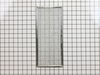
Filter frame weld at corner opened.
-
James from Katy, TX
-
Difficulty Level:Really Easy
-
Total Repair Time:Less than 15 mins
Was this instruction helpful to you?
Thank you for voting!
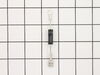
diode burnt
-
MANUEL from ESCONDIDO, CA
-
Difficulty Level:Really Easy
-
Total Repair Time:Less than 15 mins
-
Tools:Screw drivers
Was this instruction helpful to you?
Thank you for voting!
over-stove lights burned out, one fell apart while removing
Followed suggestion by previous poster to remove bottom panel...facilitated process well
Parts Used:
-
Nancy from Tempe, AZ
-
Difficulty Level:Easy
-
Total Repair Time:15 - 30 mins
-
Tools:Pliers, Screw drivers
Was this instruction helpful to you?
Thank you for voting!
Replace stovetop light socket
Very easy to replace the light socket. Unscrew screws under microwave to lower the base. remove screw at rear of light socket. Unplug power to socket. Plug wire into new socket. Replace new socket into base and replace serew. Hold base plate up to microwave and replace all screws. Do yourself a favor, if replacing one of the lights, go ahead and do both. Shipping cost is the same for 1 or 2 bulb sockets.
Parts Used:
-
Tim from Pasco, WA
-
Difficulty Level:Really Easy
-
Total Repair Time:15 - 30 mins
-
Tools:Screw drivers
Was this instruction helpful to you?
Thank you for voting!
light socket crumbling apart
Unplugged microwave before doing anything.Removed 6 screws holding the bottom of the microwave on. Disconnected 1 wire connector connecting the light sockets.Removed 1 screw on each socket to remove and install new socket. Reconnect the 1 wire connector and reinstall the 6 screws holding the bottom of the microwave on. Removed 1 screw holding the glass lens in place on each light and installed 1 bulb in each and reinstall 1 screw in each lens. Replug power cord. DONE !!
Parts Used:
-
Mike from Buford, GA
-
Difficulty Level:Really Easy
-
Total Repair Time:15 - 30 mins
-
Tools:Screw drivers
Was this instruction helpful to you?
Thank you for voting!
Oven light bulb burned out
After discovering Parts Select website and reading the experiences and installation instructions of others with similar experiences, it gave me the confidence to give it a try. I order the parts, and in a few days, they arrived. I did the following, as read from others: 1. unscrewed the 5 screws on bottom panel of microwave. 2. Had wife hold panel while I unscrewed the 1 screw holding the lamp socket 3. Pulled lamp socket out of hole 4. Used needle nose pliers to pull wiring from old lamp socket 5. plugged the two wires into new lamp socket 6. removed old bulbs (which would have been a nightmare to do by just dropping down the bulb cover - bulb had been factored glued to lamp socket and even after I removed the glue, the bulb still broke when trying to remove the bulb - had to use needle nose pliers to unscrew the base of the broken bulb) 7. placed lamp socket with new bulb back into its slot and screwed the one screw holding the lamp socket back 8. screwed back in the 5 screws that held the bottom panel.
Parts Used:
-
Phillip from Myrtle Beach, SC
-
Difficulty Level:Really Easy
-
Total Repair Time:15 - 30 mins
-
Tools:Screw drivers
Was this instruction helpful to you?
Thank you for voting!