




















JMW2327WS02 Jenn-Air Microwave - Overview
Sections of the JMW2327WS02
[Viewing 10 of 10]


Keep searches simple, eg. "belt" or "pump".
Touch-Up Paint - White
PartSelect #: PS385132
Manufacturer #: 72017
This 18 ml bottle of white appliance touch-up paint is used to cover scratches or marks on your appliance. The white touch-up paint can be used on refrigerators, microwaves, ranges, clothes dryers, an...
$17.95
In Stock

Light Bulb
PartSelect #: PS11749457
Manufacturer #: WPW10169757
This is a replacement light bulb to illuminate the inside of your oven. It is 25 watts and 120 volts. Please wear gloves during replacement if your existing bulb is shattered. Consider ordering a spar...
$58.44
In Stock
Halogen Light Bulb
PartSelect #: PS11765655
Manufacturer #: W10886919
This part is the replacement halogen light bulb for your range. The bulb is 10 watts and 12 volts. The halogen lamp lights up the inside of the oven you can see the cooktop more effectively in darknes...
$34.44
In Stock

Dryer Screw
PartSelect #: PS11746840
Manufacturer #: WP90767
This screw is sold individually.
$9.85
In Stock

Cover
PartSelect #: PS11769950
Manufacturer #: W10915651
Having issues with your Whirlpool microwave? It might be the Inlet Cover. This small part plays a big role and shields the waveguide channel in your microwave from debris and food splatters. Keeping i...
$64.85
In Stock
Turntable Motor
PartSelect #: PS11769794
Manufacturer #: W10911403
Are you tired of unevenly heated meals from your microwave? The Whirlpool Turntable Motor is the solution you need. This genuine OEM part is crucial for your microwave's performance, with its main rol...
$116.74
In Stock
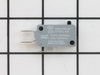
Door Switch - 250V
PartSelect #: PS2338920
Manufacturer #: W10211972
This small but important switch helps keep your microwave safe by making sure it won’t run unless the door is properly closed. It tells the microwave’s control system whether the door is open or shut,...
$57.15
In Stock
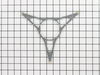
Microwave Turn Ring
PartSelect #: PS12074822
Manufacturer #: W11110134
This roller is located underneath the glass turntable. With the help of the motor, this roller helps to rotate the glass tray. This part takes the place of the coupling.
$72.55
In Stock
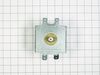
MAGNETRON
PartSelect #: PS12717479
Manufacturer #: W11346197
This part is used to generate microwave energy/heat.
$308.48
In Stock

Glass Turntable
PartSelect #: PS11723131
Manufacturer #: W10818723
Is your microwave not working like it used to? Would you love to get back the convenience of evenly heated meals in no time? Our OEM Whirlpool Glass Turntable is the solution you need. This is a genui...
$150.72
In Stock
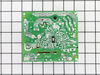
Microwave Inverter
PartSelect #: PS2342258
Manufacturer #: W10217711
The inverter acts like the brain for the microwave. It sends high voltage to the magnetron to produce heat.
$358.09
In Stock
Common Symptoms of the JMW2327WS02
[Viewing 7 of 7]Tray won’t turn
Fixed by
these parts
these parts


Show All
Won’t turn on
Fixed by
these parts
these parts

Show All
No heat
Fixed by
these parts
these parts


Show All
Noisy
Fixed by
these parts
these parts
Show All
Little to no heat when baking
Fixed by
these parts
these parts

Show All
Element will not heat
Fixed by
these parts
these parts

Show All
Door not closing properly
Fixed by
these parts
these parts
Show All

Keep searches simple. Use keywords, e.g. "leaking", "pump", "broken" or "fit".
The display kept asking me to close the door, even though the door was closed. The interior light stayed on.
I used a Google search to show how to access the area behind the front panel. There was a folded paper copy with a schematic and wiring diagram in that space.Then I used a multi-meter to determine which of the THREE micro-switches was causing the problem. I called your help line and ordered a replacement switch. The switch was delayed in transit so your agent credited me with the cost of shipping.
When the part arrived, it had three terminals instead of two as shown in the on-line picture but that did not cause any difficulty in using it. It took about 20 minutes to remove and replace the old switch.
All seems to be working well now.
Finding which of the THREE switches was the problem was the most difficult part of the repair. All three "clicked" but the defective one did not click as easily. It needed to be depressed more than the door latch can would provide. Old age?
When the part arrived, it had three terminals instead of two as shown in the on-line picture but that did not cause any difficulty in using it. It took about 20 minutes to remove and replace the old switch.
All seems to be working well now.
Finding which of the THREE switches was the problem was the most difficult part of the repair. All three "clicked" but the defective one did not click as easily. It needed to be depressed more than the door latch can would provide. Old age?
Parts Used:
-
E G from SILVERDALE, WA
-
Difficulty Level:A Bit Difficult
-
Total Repair Time:30 - 60 mins
-
Tools:Pliers, Screw drivers
16 of 21 people
found this instruction helpful.
Was this instruction helpful to you?
Thank you for voting!
Scratches in Surface
This product comes in a bottle with a brush like Liquid Paper. It goes on incredibly easy. A second coat might be needed. I wanted to prevent rust from setting in so I covered the scratches and dings. The paint is a little brighter since my washer is 10 years old but it still looks great.
Parts Used:
-
Michelle from Richardson, TX
-
Difficulty Level:Really Easy
-
Total Repair Time:Less than 15 mins
83 of 227 people
found this instruction helpful.
Was this instruction helpful to you?
Thank you for voting!
Replace KitchenAid oven light bulbs
Pull the end of the lens nearest the oven door out of the oven wall. Because our oven is several years old and the bulbs had not been previously changed, I could not pull the lens out with my hand, so used two small screwdriver under the metal tabs which hold the lens in place, the metal holder came out with the lens. Once the lens is removed, simply pull out the old bulb and, either while wearing surgical gloves or holding the bulb with a cloth (do NOT allow bare skin to touch the bulb or you will be replacing it again sooner rather than later), push the new bulb's pins into the socket. The lens then is simply pushed back into place.
Parts Used:
-
Doris from NEW JOHSONVLE, TN
-
Difficulty Level:Really Easy
-
Total Repair Time:Less than 15 mins
-
Tools:Screw drivers
10 of 10 people
found this instruction helpful.
Was this instruction helpful to you?
Thank you for voting!