




















HVM1540LP1CS General Electric Microwave - Instructions
Keep searches simple. Use keywords, e.g. "leaking", "pump", "broken" or "fit".
cooking tray was lost or broken
Opened the microwave door, installed the new tray, making sure the turn table drive notches meshed. Closed the door started the device to be certain the turntable functioned as intended. It operated as intended.
Parts Used:
-
William from Warner Robins, GA
-
Difficulty Level:Really Easy
-
Total Repair Time:Less than 15 mins
Was this instruction helpful to you?
Thank you for voting!
When opening door the microwave would turn on.
Watched How to repair a Microwave that turns on when the door is opened Video on the web. From this took a shot at the switch was the problem. When I removed the switch it was defective. The small button was in and when you turned the switch upside down the button would drop back into position. Ordered a switch for $25.oo , installed it and the microwave is working fine.
Parts Used:
-
Clarence from Rocky Ridge, OH
-
Difficulty Level:Really Easy
-
Total Repair Time:15 - 30 mins
-
Tools:Screw drivers
Was this instruction helpful to you?
Thank you for voting!
Motor and fan turned on when door was opened.
Loosen the two long anchor bolts that screw into the top of the microwave cabinet. These are usually in a shelf or cabinet directly above the microwave. Tilt the microwave forward enough to remove the 2 Phillips head screws from the top of the microwave cabinet. They are near the front. When these two screws are out, remove the fan vent. Once the fan vent is off, remove one screw that holds the control pad in place. Let it hang down. Just to the left of the control pad, you will see wires leading to three switches that close when the door is closed. Use a torx driver to remove the two screws that hold the switch bracket in place. With the bracket out, unplug the wire harnesses. On the opposite side of the wiring connected, a tab holds each switch in place. Lift the tab and slide the switches out. Usually, the bad switch will be identified by a loose or broken spring. Test them by pressing down on the switch. If you notice the bad switch spring, this is usually the bad one. When you have the new one, simply push it back into the appropriate slot and be sure that the holding tab snaps back in place. Plug the wires back in and re-attach the bracket. Put the control pad back on, then the fan vent. When down with those, push on the bottom of the microwave to lift it back into place and tighten the two anchor bolts in the top.
Parts Used:
-
Neal from White House, TN
-
Difficulty Level:Easy
-
Total Repair Time:15 - 30 mins
-
Tools:Screw drivers
Was this instruction helpful to you?
Thank you for voting!
added a charcoal filter. did not relize one was not installed.
removed the front panel as per instructions from microwave book. found where the filter went ,slid it in the space put the panel back on. Done 3 screws. I'm a 73 yr. woman and if I can do it anyone can.
Parts Used:
-
Myrtle from Haymarket, VA
-
Difficulty Level:Easy
-
Total Repair Time:15 - 30 mins
-
Tools:Screw drivers
Was this instruction helpful to you?
Thank you for voting!
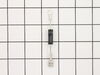
Oven failed to heat food.
Remove the microwave cover. Requires a phillips screwdriver and a torx security bit/nut driver (there are two security type screws on the back...guess they don't want you to do this at home!). I had to buy the a security bit set (about $7). The diode is easily accessible on the right side under the fan. Requires removing on small phillips screw and unplugging on electrical connection. GE provides some instructions in an envelope on top (after cover removed). There is a warning/instruction to discharge the capacitor before service. This was not a problem for me. Actual diode replacement took 30 seconds. Whole job = 15 minutes.
Parts Used:
-
Jeffrey from Gaithersburg, MD
-
Difficulty Level:Easy
-
Total Repair Time:15 - 30 mins
-
Tools:Nutdriver, Pliers, Screw drivers
Was this instruction helpful to you?
Thank you for voting!
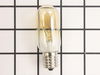
over range top light bulbs burned out
My son had to replace the bulbs because the screw that holds the bulb shield was so tight that I couldn't remove it. It was too difficult for me to do it myself.
Parts Used:
-
Elaine from Pittsburgh, PA
-
Difficulty Level:A Bit Difficult
-
Total Repair Time:Less than 15 mins
-
Tools:Screw drivers
Was this instruction helpful to you?
Thank you for voting!
Light worked, timer and control pad worked, but no turntable, no heat, no noises of any sort, just didn't start up
It was a snap using the instructions given. The key is getting into the unit. I did have to use a multimeter to find the failed switch since there are two of that type.
Parts Used:
-
Timothy from Middletown, NJ
-
Difficulty Level:Really Easy
-
Total Repair Time:Less than 15 mins
-
Tools:Screw drivers, Wrench set
Was this instruction helpful to you?
Thank you for voting!
glass broken
-
jerry from gulfport, MS
-
Difficulty Level:Really Easy
-
Total Repair Time:Less than 15 mins
-
Tools:Screw drivers
Was this instruction helpful to you?
Thank you for voting!
no lights
Remove light cover. Replace bulbs Note. Light bulbs are 40W,Too much heat for bulbs & sockets
Parts Used:
-
DON from CHEHALIS, WA
-
Difficulty Level:Really Easy
-
Total Repair Time:Less than 15 mins
Was this instruction helpful to you?
Thank you for voting!
Not heating
Removed the above stove microhood. Removed the side panels & the top panel. Diode located on right hand side of microwave. Removed with screwdriver & replaced new diode. It's best to get the microwave schematic online to pinpoint location of the part.
Parts Used:
-
Debra from Concord, CA
-
Difficulty Level:Easy
-
Total Repair Time:Less than 15 mins
-
Tools:Nutdriver, Screw drivers
Was this instruction helpful to you?
Thank you for voting!
burn ed out bulbs
I removed light bulb cover shield,took out defective bulbs and replaced with new ones. 5minute repair
Parts Used:
-
DAVID from SUGAR HILL, GA
-
Difficulty Level:Easy
-
Total Repair Time:Less than 15 mins
-
Tools:Screw drivers
Was this instruction helpful to you?
Thank you for voting!
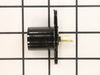
the light over the stove top went out
I tried to replace a light bulb over the cook stove without turning off the power supply. The light socket had deteriorated and the bulb base shorted out on the microwave frame. I ordered new sockets and bulbs. Replacing them was s simple matter with the power off. However, there was still no lights working with the power on. I pulled to cover off on top of the microwave (two screws) and checked the fuse. Continuity test showed it to be ok. Next I pulled the cover off the control panel and pulled out the mother board. On the back side I noticed two burnt pins. I applied solder with a solder gun to replace the burnt off solder. I put it all back together and it works fine.
Parts Used:
-
charles from st augustine, FL
-
Difficulty Level:A Bit Difficult
-
Total Repair Time:1- 2 hours
-
Tools:Screw drivers
Was this instruction helpful to you?
Thank you for voting!
Bulb Light Replacement
I thought I could just unscrew the bulbs in the SpacemakerXL Microwave Oven. The bulbs melted into the bulb socket so every attempt to unscrew the bulb with pliers just broke the socket. So I took out the few screws holding up the bottom panel(with the bulbs and filters). I unplugged the electrical connection and took out the sockets but I used PAM Cooking oil on the electrical connections plugging into the sockets to avoid pulling the wire holders from the connection. Replacing both bulbs and the sockets at the same time makes sense since the heat from the stove melts the bulbs in the socket.
Parts Used:
-
James from Walpole, MA
-
Difficulty Level:A Bit Difficult
-
Total Repair Time:1- 2 hours
-
Tools:Pliers, Screw drivers
Was this instruction helpful to you?
Thank you for voting!
Microwave would not turn on
Microwave would not turn on. Lights and fan worked fine. Before the microwave stopped completely, it would turn the microware fan on even when door was open. I read the reviews and they were exactly the same issue that others were facing. Once I opened the front panel and got to the switches it was easy to figure out which switch was bad as it was the one that was soft (When clicking it). It was hard to take it out though (it seemed stuck). So, I used a plier to yank it out. I put in the new switch and everything worked just great! I would like to thank other comments that were left on the site to make my task much easier. Thank you (to the commenters on PartsSelect), you not only saved me money, but also ensured that I learn about the microwave more and give me the confidence that I could fix it.
Parts Used:
-
Prashant from Dardenne Prairie, MO
-
Difficulty Level:Really Easy
-
Total Repair Time:1- 2 hours
-
Tools:Pliers, Screw drivers, Socket set
Was this instruction helpful to you?
Thank you for voting!
Converted an over the range microwave from non vented ductless to outside vent.
Installation of the damper was effortless but removing the microwave, cutting holes vertically through an overhead cabinet then installing ducting with a ninety degree bend, through another cabinet, and then through outside wall consumed most of the time and effort.Your service, packaging, and timely (next day!) were extremely helpful.
Parts Used:
-
Emanuel from Woodstock, VA
-
Difficulty Level:A Bit Difficult
-
Total Repair Time:More than 2 hours
-
Tools:Screw drivers
Was this instruction helpful to you?
Thank you for voting!