




















CEW3330ACB Magic Chef Wall Oven - Instructions
Keep searches simple. Use keywords, e.g. "leaking", "pump", "broken" or "fit".
Oven would not heat on Back Cycle
The thermocouple was suspect. It should be super easy- two screws, but the wiring harness would not pull through on my oven. I confirmed the procedure with the PartSelect video which is good. The harness was caught and broke so I had to pull the oven out partially to get to the harness. The sensor did check bad on the multimeter (resistance too high- Google it, I did) so I ordered the part. Once the new part was installed the oven still did not function. So I had to get busy with the multimeter and pull the oven again. On the back of my oven near the wire to the bake element is a Hi Limit Switch which cuts off the bake element if the outside of the oven gets above the preset temperature. Mine was cracked and faulty and had to be replaced. The oven works great now.
Parts Used:

-
Jeff from Thousand Oaks, CA
-
Difficulty Level:A Bit Difficult
-
Total Repair Time:30 - 60 mins
-
Tools:Screw drivers
Was this instruction helpful to you?
Thank you for voting!
Lower oven burner went out.
Made sure to turn off power to oven. Then plug in the lead at the end of the bake element screw it back into the back of the oven. Turn the power back on reset the clock and turn on the oven to make sure that it worked. Which it did and things are back to normal . Our oven went out on Christmas morning.
Parts Used:

-
Ken from Missouri City, TX
-
Difficulty Level:Really Easy
-
Total Repair Time:1- 2 hours
-
Tools:Screw drivers
Was this instruction helpful to you?
Thank you for voting!
oven temperature was of & then taking along time to heat
-
Barbara from Newark, DE
-
Difficulty Level:Really Easy
-
Total Repair Time:15 - 30 mins
-
Tools:Screw drivers
Was this instruction helpful to you?
Thank you for voting!
replaced gasket around inside door
It was easy because the clips were already on the new door gasket. Just had to remove old door gasket and replace it with the new one. Very simple job.
Parts Used:

-
Betty from Hamburg, PA
-
Difficulty Level:Really Easy
-
Total Repair Time:Less than 15 mins
Was this instruction helpful to you?
Thank you for voting!
change oven sensor
-
Lloyd from Eau Claire, WI
-
Difficulty Level:Really Easy
-
Total Repair Time:Less than 15 mins
-
Tools:Screw drivers
Was this instruction helpful to you?
Thank you for voting!
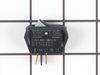
Oven light Switch
Compressed the springs and removed the damaged switch, then changed the wiring over to the new switch and press into place, worked fine.
Parts Used:
-
William from APACHE JUNCTION, AZ
-
Difficulty Level:Really Easy
-
Total Repair Time:Less than 15 mins
-
Tools:Pliers
Was this instruction helpful to you?
Thank you for voting!
Oven have F2 and F3 codes following cleaning cycle making oven inoperable
Remove 2 screws in upper left corner of stove holding sensor in place. Pull sensor out and disconnect plastic electrical connector. Select appropriate adapter (both styles provided with new part) & reinstall. Power up stove and select bake on control unit to test. Works like a charm!
Parts Used:

-
Timothy from Longmeadow, MA
-
Difficulty Level:Easy
-
Total Repair Time:Less than 15 mins
-
Tools:Pliers, Screw drivers
Was this instruction helpful to you?
Thank you for voting!
Light bulb failure
Received the part the day after ordering. Appreciated the quick service and repair took less than a minute.
Parts Used:
-
Grant from Alexandria, VA
-
Difficulty Level:Really Easy
-
Total Repair Time:Less than 15 mins
Was this instruction helpful to you?
Thank you for voting!
Fan runs continually ,door locked,error code f2,f3,f7
Turned off breaker,opened door with bent coat hanger by sliding right to left the coat hanger to open the door, remover 2 screws holding in the sensor in upper left corner of the oven. Remove the sensor (gently) with the wire connection from back of oven pulling sensor out a out 8 inches . Disconnect plug. Install new sensor with matched harness /.connection, installed 2 screws ,turned on breaker.
Parts Used:
-
John from Dacula, GA
-
Difficulty Level:Really Easy
-
Total Repair Time:Less than 15 mins
-
Tools:Screw drivers
Was this instruction helpful to you?
Thank you for voting!
Had code F1 and F3 on my oven. Oven wouldn't heat.
Watched the video and it was as easy as described. Not many things go as easily as this.
Parts Used:
-
Cindy from Polson, MT
-
Difficulty Level:Really Easy
-
Total Repair Time:Less than 15 mins
-
Tools:Screw drivers
Was this instruction helpful to you?
Thank you for voting!
Inside Door Glass Broke
Repair was super easy, Remove Screws. (the hardest part was trying to remove the edging of the door without cracking it, or breaking the tabs used to secure it) Once I got the edges off, I slid the front of the door off, removed the screws and braces holding the outer glass. Picked out the broken pieces, cleaned all the glass and inside the door and put it all back together. If I didn't clean everything, it would've taken half the time.
Parts Used:
-
Donn from South Plainfield, NJ
-
Difficulty Level:Really Easy
-
Total Repair Time:15 - 30 mins
-
Tools:Screw drivers
Was this instruction helpful to you?
Thank you for voting!
The oven was not heating up to temperature
I replaced the oven sensor which was easy to replace. A pigtail wire was provided with the sensor which is intended to be installed first so you don't have to reach around the front and back of the oven at the same time. The replacement was easy. However, that turned out not to be the problem. The real problem was the maytag electronic clock control timer, temperature control unit. The part number is 7601P177-60. This device has been discontinued and I was fortunate enough to find the part at a local supplier. Once I replaced this, the problem went away. The oven heats up normally. My original symptom was that when setting the oven temperature to something like 350 degrees, the display would rapidly report heating up the oven to that temperature, and the oven was only mildly warm. If you have that symptom, it is probably not the oven sensor. It is the electronic clock unit. Hope you can find one. If you can't, I think you need to by a new oven. Regards
Parts Used:
-
Max from Bothell, WA
-
Difficulty Level:Really Easy
-
Total Repair Time:15 - 30 mins
-
Tools:Screw drivers
Was this instruction helpful to you?
Thank you for voting!
Oven randomly turned off and locked
-
Robert from homilton, MT
-
Difficulty Level:Really Easy
-
Total Repair Time:15 - 30 mins
-
Tools:Screw drivers
Was this instruction helpful to you?
Thank you for voting!
F-4 Code, oven wouldn't heat
Watching the video of how to replace the sensor was great help and much appreciated, the only difference was that my wires were much shorter and I had to pull the oven out of the cabinet to get to the back of the oven to release the clip holding the wires together, unlike the video where the man jiggled the wires until the clip holding the wires together came through the little slot where the probe is attached, otherwise it was pretty simple, just a few extra steps to pull the oven forward to get to the rear to release the clip holding the wires together. Once I was able to release the clip I used one of the 2 adapters that was sent with the sensor probe and attached them after putting the wires through the hole where the probe was attached first then replaced the 2 screws that holds the sensor in place, slid the oven back in and turned the circuit breaker back on and it works perfectly. The video gave me the confidence to do this job though and I thank PartSelect very much for being a great company to help with videos and sending the parts so quickly.
Parts Used:
-
Gary from San Jose, CA
-
Difficulty Level:Easy
-
Total Repair Time:15 - 30 mins
-
Tools:Screw drivers
Was this instruction helpful to you?
Thank you for voting!