PVM9195SF1SS General Electric Microwave - Overview

Sections of the PVM9195SF1SS

[Viewing 3 of 3]

Manuals & Care Guides for PVM9195SF1SS

Click to download
Keep searches simple, eg. "belt" or "pump".
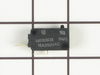
Secondary Door Switch – Part Number: WB24X829
Secondary Door Switch
★★★★★
★★★★★
(2)
PartSelect #: PS237421
Manufacturer #: WB24X829
  No Longer Available
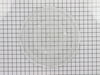
Glass Light Lens – Part Number: WB36X10071
Glass Light Lens
★★★★★
★★★★★
(2)
PartSelect #: PS247275
Manufacturer #: WB36X10071
$28.20
  Special Order
Microwave Halogen Light Bulb – Part Number: WB36X10213
Microwave Halogen Light Bulb
★★★★★
★★★★★
(1)
PartSelect #: PS651484
Manufacturer #: WB36X10213
This halogen light bulb is an inch and a half long. Carrying 120 volts and 20 watts, it is used with some microwave ovens.
$36.73
  Special Order
Monitor Door Switch – Part Number: WB24X830
Monitor Door Switch
★★★★★
★★★★★
(1)
PartSelect #: PS237422
Manufacturer #: WB24X830
$58.30
  Special Order
Glass Cooking Tray – Part Number: WB49X10063
Glass Cooking Tray
PartSelect #: PS250009
Manufacturer #: WB49X10063
This tray rotates in your microwave ensuring more even temperatures and is approx.14-1/2 inches in diameter.
$117.41
  Special Order
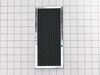
Charcoal Filter – Part Number: WB02X11544
Charcoal Filter
★★★★★
★★★★★
(1)
PartSelect #: PS7783258
Manufacturer #: WB02X11544
$45.07
  Special Order
Diode – Part Number: WB27X10597
Diode
PartSelect #: PS239740
Manufacturer #: WB27X10597
This part allows power to go one way only.
$72.08
  Special Order
Microwave Halogen Light Bulb – Part Number: WB25X10026
Microwave Halogen Light Bulb
PartSelect #: PS3510728
Manufacturer #: WB25X10026
The 50-Watt light bulb illuminates the surface below the microwave or the interior of the microwave.
$58.97
  Special Order
LEVER-S/W – Part Number: WB06X10128
LEVER-S/W
PartSelect #: PS227843
Manufacturer #: WB06X10128
  No Longer Available
COUPLER – Part Number: WB06X10815
COUPLER
PartSelect #: PS2369898
Manufacturer #: WB06X10815
Struggling with uneven cooking or a stationary microwave tray? It may be time to replace your Turntable Motor Coupler. This is where our GE Turntable Motor Coupler comes in. This handy little componen...
$58.36
  Special Order
MAGNETRON Assembly – Part Number: WB27X11079
MAGNETRON Assembly
PartSelect #: PS2370172
Manufacturer #: WB27X11079
When your microwave stops heating your food properly, it could be time to replace the magnetron. This GE Magnetron Assembly is tailored to get your microwave cooking at full power again. Why is this i...
$215.53
  Special Order
Magnetron Safety Cut-Off – Part Number: WB27X11095
Magnetron Safety Cut-Off
PartSelect #: PS2370185
Manufacturer #: WB27X11095
  No Longer Available

Questions And Answers for PVM9195SF1SS

Ask our experts a question about this model and we'll get back to you as soon as possible!

4 questions answered by our experts.
  • 1
Sort by:
Sorry, we couldn't find any existing answers that matched.Try using some different or simpler keywords, or submit your new question by using the "Ask a Question" button above!
Terry
April 4, 2023
I need the 2 bulbs on the bottom of the microwave, not sure if that is bulb listed above in parts list. Thank you
For model number PVM9195SF1SS
PartSelect logo
Hello Terry, Thank you for contacting us. We have researched the model you have provided and have found the part you are looking for is PartSelect Number PS651484. Thank you for the inquiry, good luck with the repair!

Was this helpful?
Thank you for voting!
Related Parts:
Pamela
November 28, 2023
No power
For model number PVM9195SF1SS
PartSelect logo
Hello Pamela, thank you for contacting us. We believe your microwave is having this problem because of the blown fuse. The fuse does not come separately. It comes as an assembly with the noise filter, part number PS8766977. We hope this helps!

Was this helpful?
Thank you for voting!
Related Parts:
Rita
January 10, 2024
The decals above the light, fan & timer switches are no longer legible.
For model number PVM9195SF1SS
PartSelect logo
Hello Rita, thank you for the question. You may need to replace the control panel, part number PS11736424. We hope this helps!

Was this helpful?
Thank you for voting!
URSULA
March 28, 2024
the lights under the microwave will not turn off - I have unplugged the unit and pluged it back in after 30 min and the light still will not turn off - I have removed the bulbs for now
For model number PVM9195SF1SS
PartSelect logo
Hello Ursula, thank you for reaching out. Based on our understanding of the issue, we would suggest checking the electronic control board, part number PS8755571, to solve the problem. Glad to be of assistance!

Was this helpful?
Thank you for voting!
Related Parts:
  • 1

Common Symptoms of the PVM9195SF1SS

[Viewing 7 of 7]
Doesn’t shut off
Fixed by
these parts
Fixing Fixing
Show All
Won’t turn on
Fixed by
these parts
Fixing Fixing Fixing
Show All
No heat
Fixed by
these parts
Fixing Fixing Fixing
Show All
Tray won’t turn
Fixed by
these parts
Fixing Fixing
Show All
Touchpad does not respond
Fixed by
these parts
Fixing
Show All
Noisy
Fixed by
these parts
Fixing
Show All
Door not closing properly
Fixed by
these parts
Fixing
Show All
Keep searches simple. Use keywords, e.g. "leaking", "pump", "broken" or "fit".
light worked, timer and control pad worked, but no turntable, no heat, no noises of any sort, just didn't start up
Noted on partselect.com that someone else with this problem, found it to be secondary door switch. There are three door switches in this model, but online info noted that one of the three might feel "soft" (in my case, one switch clicked in a rather "jiggly" way, the other two were strong decisive clicks.) To access the door switches on this model was the only difficult part. First use a torx bit to remove the two torx screws below the latches inside the microwave. This frees the latching part inside, that holds the door switches, which you will remove after you take off the control panel. The top grill has to come off before you can remove the door panel. Remove the screws above the grill, on the microwave top cover, The grill on this model is covered with a panel that moves out when it vents. After removing the two top screws, the covered grill vent slides left to remove. Be careful, as the sliding tabs are plastic. Wiggle and jiggle it, to slip it off. Below the removed grill, is a small metal grill with one screw in lower center. Remove that screw, and wiggle that out. You'll then see the one screw that holds on the control panel. Remove this screw, and lift the control panel up to remove. Again, go slowly and gently, as the bottom tabs holding the control panel in, are also plastic and easily broken. Lay the control panel on something, (I used the coffee maker) and pull out the wire bundles tucked on the left, that are attached to the latching panel. Wiggle the latching panel gently to lift it up off of it's plastic tabs and pull it out towards you, so you can see the three door switches. Each switch (part number WB24X829) has a little black switch on it. Feel each switch with either your finger, or a screwdriver to see which one doesn't "click" strongly. The weak one is the one you will replace. The door switches are fitted into a tab, and plugged into their wires. Remove the defective switch, pull out the wires, and replace it with the new switch, plugging back the wires, and slipping it back into it's plastic tabs. Then put everything back together in reverse order. The entire job took me fifteen minutes EXCEPT for figuring out how to slide off the upper grill, which I have told you. A repairman would have cost $150, the part was $18. AND, there's a good chance, the other two switches will get "used up" in the next year or so as well, so I'll be ready next time. Thank you, Partselect, why work all day, to make money, only to give it to somebody else, for fifteen minutes of work. All I needed was the knowledge.
Parts Used:
Secondary Door Switch
  • Marla from Arlington, TX
  • Difficulty Level:
    Easy
  • Total Repair Time:
    Less than 15 mins
  • Tools:
    Screw drivers
320 of 387 people found this instruction helpful.
Was this instruction helpful to you?
Thank you for voting!
Not working as far as heating or cooking
Replaced High Voltage Diode. Very carfully due to the extream danger of a electrical shock.
Parts Used:
Diode
  • Theodore from Medical Lake, WA
  • Difficulty Level:
    Really Easy
  • Total Repair Time:
    Less than 15 mins
  • Tools:
    Screw drivers
151 of 361 people found this instruction helpful.
Was this instruction helpful to you?
Thank you for voting!
Microwave Fan Turned on When Door Was Opened
To get to the switches you need to remove the metal cover/housing of the microwave, by first removing several screws that hold it in place, and then sliding the cover towards the back of the unit. You'll find the switches in some plastic holders above the door-open button, and it's its easy to see how the mechanism engages/disengages the switches when the door is opened and closed.

If it is not obvious which switch is bad, in our case the bad switch felt "soft" when we pressed the switch button with our fingers. A good switch has a firm "click" when pressed.

The switches are easy to replace - pop out the old switch (no tools required) and pull off the electrical connectors. Then pop in the new switch and reattach the connectors.
Parts Used:
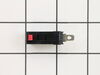
Secondary Door Switch
  • Bishop from Coupland, TX
  • Difficulty Level:
    Easy
  • Total Repair Time:
    30 - 60 mins
  • Tools:
    Screw drivers
51 of 64 people found this instruction helpful.
Was this instruction helpful to you?
Thank you for voting!