




















PD486GLBS (01) Thermador Range - Overview
Sections of the PD486GLBS
[Viewing 1 of 1]
Keep searches simple, eg. "belt" or "pump".
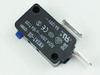
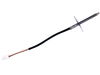
TEMPERATURE SENSOR
PartSelect #: PS8729210
Manufacturer #: 00627375
This oven temperature sensor is designed to accurately measure the internal temperature of the oven cavity and relay that information to the appliance’s electronic control system for precise heat regu...
$199.26
In Stock

Questions And Answers for PD486GLBS
We're sorry, but our Q&A experts are temporarily unavailable.
Please check back later if you still haven't found the answer you need.
Keep searches simple. Use keywords, e.g. "leaking", "pump", "broken" or "fit".
Oven does not maintain consistent temperature
Remove slide racks from oven. At the back right corner of oven unscrew heat sensor probe. Access rear of range. Remove screws holding back panel. Find wire from temperature probe where it passes through back wall of over and unclip it pulling probe wire and probe out back of oven. From the inside of oven, push chopstick through hole probe wire was routed through, to find hole in back wall of oven. Once chopstick is visible from back of oven, with chopstick enlarge hole through visible insulation. This is the opening the new probe wire needs to be routed through. From inside oven push new wire, using chopstick, through this hole and reattach wire at back of oven using the plastic clip on the wire. From inside oven screw probe to back of oven wall, reattach outside panel to back of oven, turn gas back on, plug range back in, check oven operates, and push range back in place, reinstall racks. You may have to remove oven door if you have trouble reaching to the back of the oven to access the probe. YouTube videos are easy to find showing how to do that.
Parts Used:
-
David from LONG BEACH, CA
-
Difficulty Level:Easy
-
Total Repair Time:30 - 60 mins
-
Tools:Screw drivers
2 of 6 people
found this instruction helpful.
Was this instruction helpful to you?
Thank you for voting!