




















DPGT750ECW General Electric Dryer - Overview
Sections of the DPGT750ECW
[Viewing 1 of 1]
Keep searches simple, eg. "belt" or "pump".
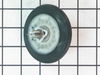
Drum Support Roller with Axle
PartSelect #: PS959905
Manufacturer #: WE03X10008
This part is the replacement drum support roller for your dryer. The roller is approximately 3 inches in diameter and is sold individually. The main reason to replace the drum support roller is if the...
$74.27
Special Order
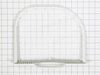
Lint Filter
PartSelect #: PS960013
Manufacturer #: WE18X10008
This filter collects lint as it passes through the dryer vent.
No Longer Available
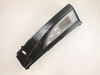


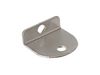
Handle - Stainless Steel
PartSelect #: PS959861
Manufacturer #: WE01X10189
Screws are sold separately.
$175.85
Special Order

Questions And Answers for DPGT750ECW
We're sorry, but our Q&A experts are temporarily unavailable.
Please check back later if you still haven't found the answer you need.
Common Symptoms of the DPGT750ECW
[Viewing 2 of 2]


Keep searches simple. Use keywords, e.g. "leaking", "pump", "broken" or "fit".
There was a grinding noise while the dryer was being used.
We removed the top and front of the dryer and found that the drum roller bearings had gone out on one side. All this happenend on a weekend with no reair store open. We googled the cut sheet for the dryer, found the part number we needed and ordered the parts (we went ahead and replaced both rollers) from partselect.com. For $70 and our own labor, we completed the repair by Wednesday evening. I feel certain we saved at least $100 if not more by doing the work ourselves.
Parts Used:
-
Dan from Mineola, TX
-
Difficulty Level:Easy
-
Total Repair Time:30 - 60 mins
-
Tools:Screw drivers, Socket set
36 of 56 people
found this instruction helpful.
Was this instruction helpful to you?
Thank you for voting!
No hot air being produced
Once I figured out how to get into the bottom end of the dryer, it went really smooth.
1. Remove 4 screws from the top panel at the rear of the machine. This allows the top section of the dryer to be lifted up.
2. Under the top section is a plastic cover which covers the drum, this does not need to be removed. There are two screws in the top which hold the front panel in place, one at the front left top and one at the front right top. remove these two screws. Keep screws seperated, as there are several different types which need to be removed so remeber which go where.
3. Open the dryer door there are four screws which need to be removed. Once these are removed the front panel can be tipped out and the door switch wiring needs to be unplugged to remove the front panel and set aside.
4. Remove the left nylon guide at the bottom front of machine, it is in the way to remove the blower duct.
5. Remove blower housing cover.
6. Reach behind blower housing and disconnect the thyrmister and temperature limit wiring.
7. Remove the blower wheel by removing center nut. It is removed by turning nut clockwise while bracing the wheel with a screw driver so it won't turn.
8. Remove three screws that are behind the the blower wheel.
9. Remove the two base screws that hold the housing to the bottom of the machine.
10. Now you can remove the plastic duct from the machine.
11. remove two screws at the right side og the blower motor.
12. Disconnect wire harness from motor.
13. Lift up on right side of motor bracket and slide to the right. You can now remove the motor and bracket.
14. Remove two clips that hold the motor to the bracket.
15. Install new motor in bracket and replace clips.
16. You can now install the motor and bracket assembly by reversing the order of these steps.
1. Remove 4 screws from the top panel at the rear of the machine. This allows the top section of the dryer to be lifted up.
2. Under the top section is a plastic cover which covers the drum, this does not need to be removed. There are two screws in the top which hold the front panel in place, one at the front left top and one at the front right top. remove these two screws. Keep screws seperated, as there are several different types which need to be removed so remeber which go where.
3. Open the dryer door there are four screws which need to be removed. Once these are removed the front panel can be tipped out and the door switch wiring needs to be unplugged to remove the front panel and set aside.
4. Remove the left nylon guide at the bottom front of machine, it is in the way to remove the blower duct.
5. Remove blower housing cover.
6. Reach behind blower housing and disconnect the thyrmister and temperature limit wiring.
7. Remove the blower wheel by removing center nut. It is removed by turning nut clockwise while bracing the wheel with a screw driver so it won't turn.
8. Remove three screws that are behind the the blower wheel.
9. Remove the two base screws that hold the housing to the bottom of the machine.
10. Now you can remove the plastic duct from the machine.
11. remove two screws at the right side og the blower motor.
12. Disconnect wire harness from motor.
13. Lift up on right side of motor bracket and slide to the right. You can now remove the motor and bracket.
14. Remove two clips that hold the motor to the bracket.
15. Install new motor in bracket and replace clips.
16. You can now install the motor and bracket assembly by reversing the order of these steps.
Parts Used:
-
Brad from Riverton, UT
-
Difficulty Level:A Bit Difficult
-
Total Repair Time:1- 2 hours
-
Tools:Screw drivers, Socket set
23 of 24 people
found this instruction helpful.
Was this instruction helpful to you?
Thank you for voting!
The membrane buttons on the control panel stopped working
Replaced the control panel, very easy to do. Note: There is a RH and a LH control panel available. The RH or LH refers to placement of the screen and not the position of the machine. Also for troubleshooting, you can replace the suspected bad control panel with the one off the other machine as this panel is tha same for the washer and dryer.
Parts Used:
-
Matt from Loxahatchee, FL
-
Difficulty Level:Really Easy
-
Total Repair Time:Less than 15 mins
-
Tools:Screw drivers
9 of 11 people
found this instruction helpful.
Was this instruction helpful to you?
Thank you for voting!